Audible
Your Bridge can sign in to your Audible accounts, list the books each one owns and find the ones already on your server. The console shows the result, and from it you can have the Bridge back up the books you bought into your library: it downloads each one from Audible, removes its copy protection (a lossless copy, chapters kept) and places it beside your other books.
The Bridge lists, matches and backs up. It doesn't keep listening places in step with Audible yet: that comes in a later version, and the Keep the listening place in step choice for each account is kept for then.
Audible backups are for making a personal backup of books you bought, with your own account, for your own listening. Laws on removing DRM, even from your own purchases, differ from country to country, and in some places it is not allowed at all, even for personal use. Check your local law, and keep the copies for yourself. The console repeats this on the titles page and in the backup dialogs.
What it needs
- A Bridge paired with your server and online, in a version that supports Audible (its Accounts tab has an Audible card). See Running a Bridge.
- An Audible account signed in on the Bridge. You sign in, and choose who and which library each account is for, on the Bridge's own page only: Bridge accounts. The server never sees your Amazon password or the Bridge's sign-in.
- The Audible module turned on in Server > Settings > Modules. It starts off. Its card says An online Bridge that supports Audible until the Bridge is ready, and On, but nothing is checked until the Bridge is ready. when you turn it on before then.
- To back up: the account's library Ready for the Bridge (mapped and writable, see Libraries), and room for the books, both in the Bridge's data folder (where it downloads) and in the library.
While the module is on, Server > Settings gains an Audible page, and Settings > Bridge an Audible accounts card. Listeners see nothing of it: the player has no Audible screens. A book once backed up is an ordinary book of the library, which its listeners see as usual.
The Audible accounts card
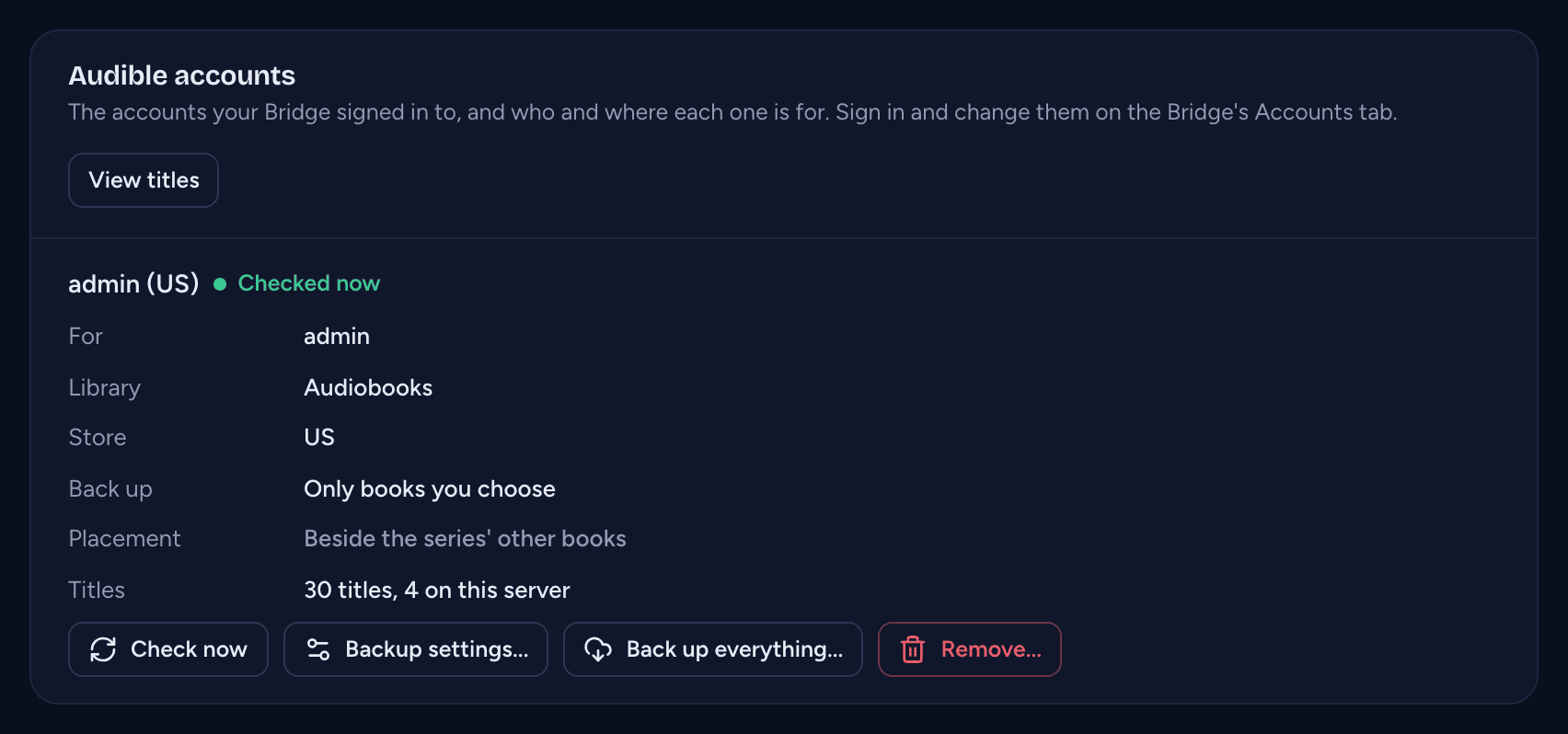
On Server > Settings > Bridge, under Libraries, the Audible accounts card lists every account the Bridge has signed in to. The card is there only while a Bridge is paired; with none paired, use the titles page. Who the account is for and its library are the Bridge's: you change them on the Bridge's Accounts tab (with no account yet, the card links to it when the Bridge has told the server its page's address). What the account backs up, and where, is set here. View titles opens the titles page.
For each account:
| Row | What it shows |
|---|---|
| The heading | the account's name (the person and the store, such as "Chris (US)", unless the Bridge gave it another), and Checked with when the Bridge last finished checking it, or Not checked yet |
| For | the person on your server the account belongs to |
| Library | the books library its titles are matched against |
| Store | the Audible store it buys from (US, UK, DE and so on) |
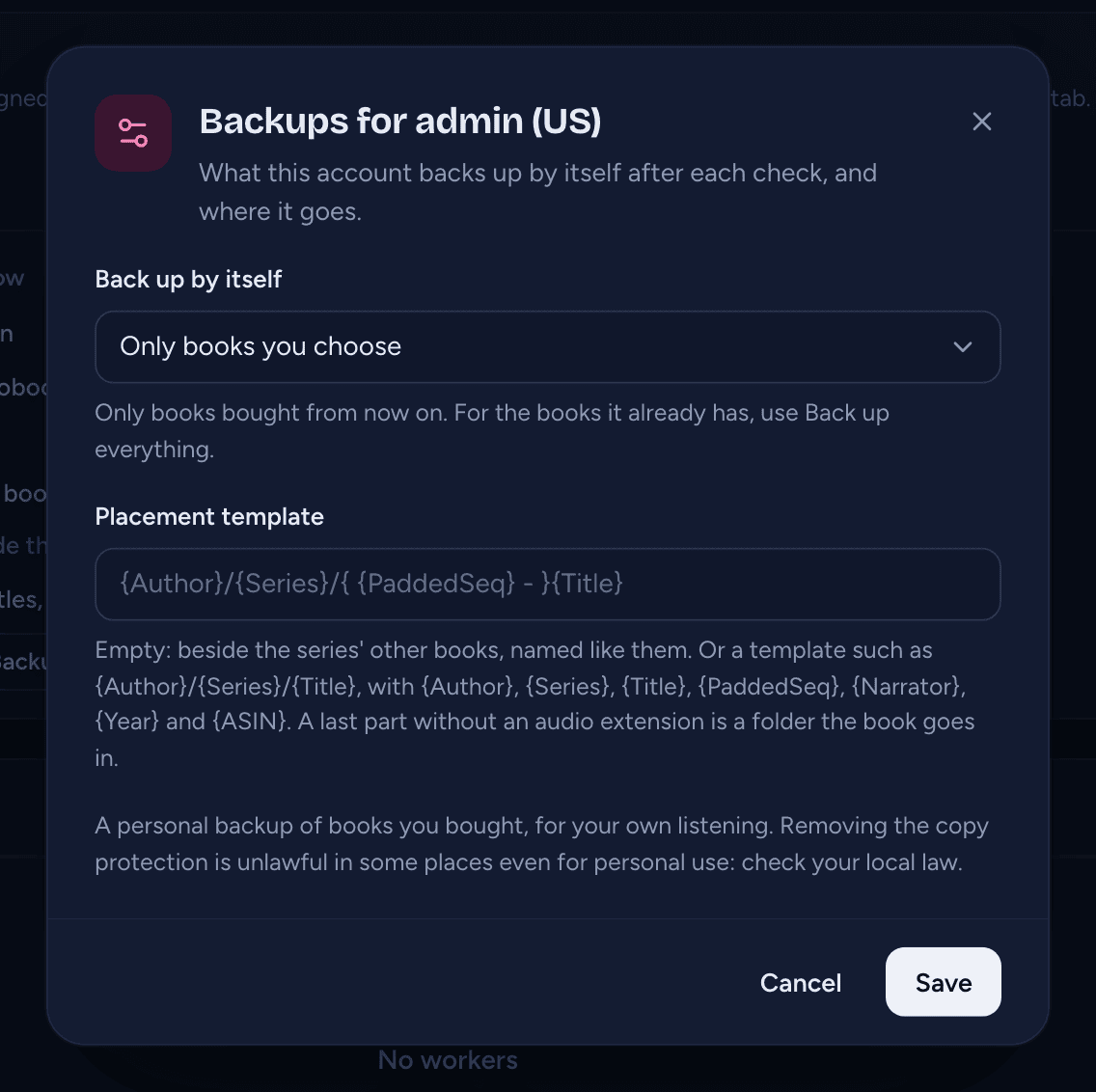
| Back up | what the account backs up by itself after each check: Every new book, New books in series you have or Only books you choose (see Backing up by itself) |
| Placement | where its backups go: Beside the series' other books, or the account's placement template (see Where backups go) |
| Titles | how many titles the account has, and how many of them are on this server |
Each account has Check now, Backup settings... (its policy and placement template, below), Back up everything... (below) and Remove... (below).
With no account yet, the card says No Audible accounts yet, with Open the Bridge's Accounts tab.
Paused marks an account whose library was deleted: the Bridge isn't asked to check it, its titles lose their matches, and nothing of it can be backed up (its Back up buttons are off). Choose another library for it on the Bridge's Accounts tab (Change) to carry on.
The titles page
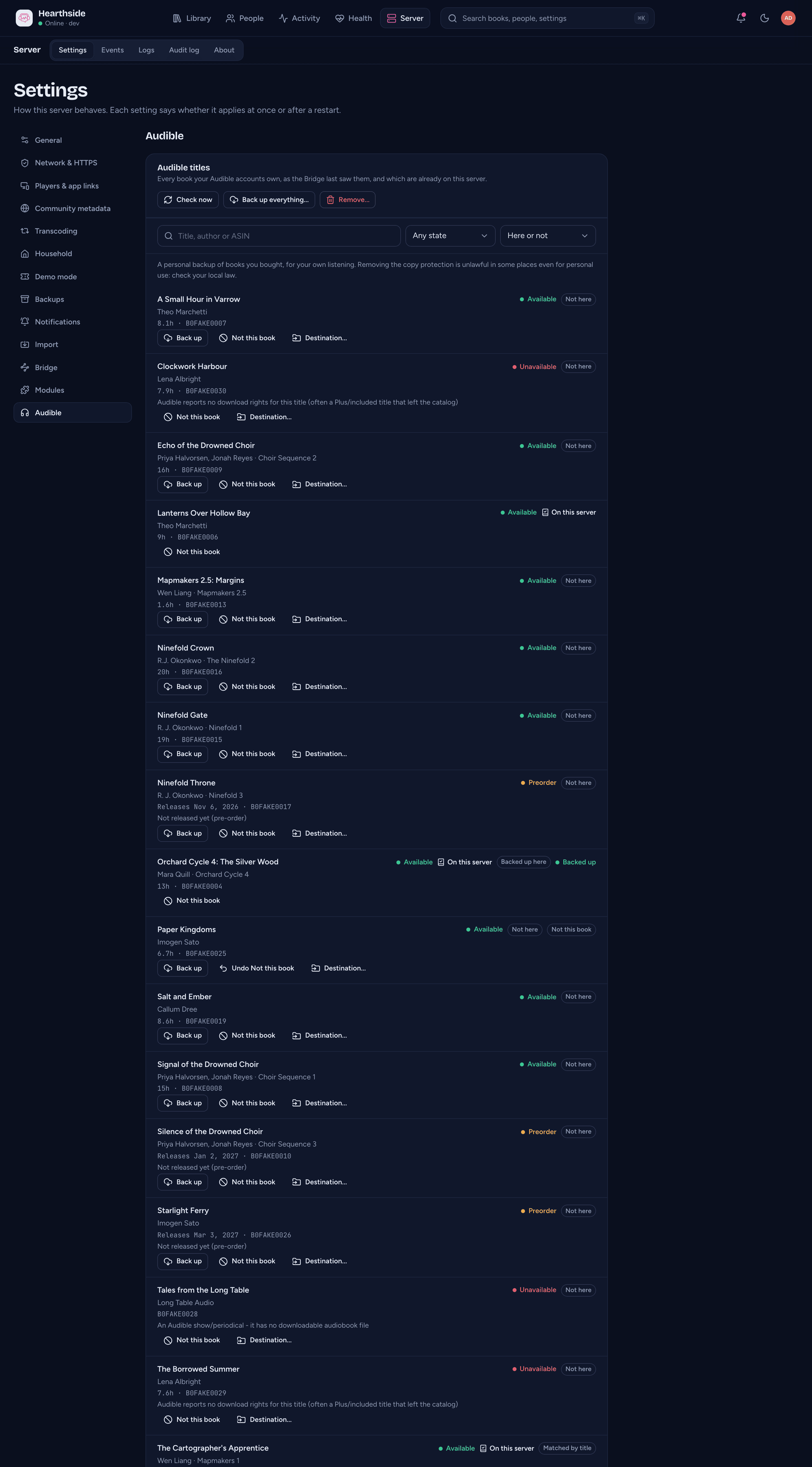
Server > Settings > Audible lists every title your Audible accounts own, as the Bridge last saw them, sorted by title. Each row shows the title, its authors and series, then its length, the release date of a preorder, its ASIN, (with several accounts) which account owns it, and To ... when you gave it a destination. A title Audible won't let you download says why, and so does a backup that failed. Under it are the title's backup buttons: Back up, Not this book and Destination....
On the right: its state, and On this server (a link to the book's page in the console) or Not here. Matched by title marks a match made from the title and author rather than the ASIN (see How titles are matched), Backed up here a book the Bridge backed up, and Not this book a title you marked. Last comes the backup's status, when it has one.
Above the list:
- Search titles finds a title by its name, one of its authors, or its exact ASIN.
- Account (only with more than one account) shows one account's titles.
- State shows titles in one state.
- On this server shows only the titles that are here, or only those that are Not here yet (a title marked Not this book counts as not here).
The page shows 50 titles at a time; Load more adds the next ones. The list refreshes on its own when the Bridge finishes a check, and every few seconds while a backup is waiting or running.
Check now, Back up everything... and Remove... sit at the top of the page for the account you chose under Account, or for the only one there is.
Title states
| State | Means |
|---|---|
| Available | the account owns it and can download it |
| Preorder | not released yet; the row says when it is |
| Unavailable | the account has it but Audible won't let it be downloaded (for example a podcast or a periodical, or a title without download rights); the row says why |
| No longer in the library | it was in the account before, but the Bridge's last complete check didn't find it (returned, or removed from the account) |
Audible sometimes gives a title it has had for years a placeholder release date far in the future (such as the year 2200). A date more than two years ahead is ignored, so such a title is Available, not a Preorder.
How titles are matched
At each check, the Bridge reads the account's library from Audible and your books library from the server, and matches each title to a book there:
- By ASIN first. A book whose ASIN (in its tags, or set in the console) is the title's matches at once.
- Then by title and author, with the series, the book's number in it and the narrators to help. These show Matched by title.
A few things help a title find its book:
- The same title by the same author matches, even when Audible files the book under a differently named series than your tags do. A title that is just the series name and a number ("Dragon Heart: Book 6") needs the number to agree.
- The book's number in the series tells the volumes of a series apart. When
your tags don't give it, a code at the start of the book's folder name does:
DH06 - Land of Magicis book 6 of Dragon Heart,BDM01 - Oathbound Healerbook 1 of Beneath the Dragoneye Moons. The code's letters must be the series' initials (all of them or some, in order). Other codes, likeHALO 07in the Halo series, are ignored. This doesn't change the book's position anywhere else on your server. - A folder covering several books, like
LAM05-06, is treated as an omnibus, so Audible's book 5 on its own won't match it. An Audible pack of books 5 and 6 can. A pack can also match a folder numbered as its first book (LAM05); it shows as on this server, but that book's details are not updated from the pack.
When several titles match one book, the best match keeps it. The others show Not here, with contested under the title: the book is probably here under another title. If the best titles tie, none keeps it, unless they are the same book owned twice (the same title, author and number): then all of them keep it. Back up everything and the policies never back up a contested title; Back up still does, if you are sure it isn't here.
When a book matched by title and author has no ASIN yet, the Bridge gives it the Audible title's ASIN, so later checks, and the community metadata, match it exactly. It doesn't when more than one title matched the book, even if one of them kept it (the match is in doubt), when the title is a preorder (the book you have is another edition), or when the book already has an ASIN, including one you set or cleared in the console: those are never replaced.
Matches follow your books: when a book is renamed or moved (or joined with another in the console), its titles stay matched to it. A book the Bridge backed up stays its title's match on later checks while it is in the library. Deleting a library clears the matches into it and pauses the accounts mapped to it.
Backing up a book
Each title on the titles page has its own buttons:
- Back up: for a title that is Available (or a Preorder, see Preorders) and not on this server, with no backup already waiting or running. It is off while the account is Paused.
- Not this book (and Undo Not this book): see below.
- Destination...: where this one title goes, for a title not on this server (see Choosing a destination).
Press Back up and the console says Backing up with the title: the Bridge downloads it in turn, one book at a time per account. Asking for a book that is already on this server, or one already waiting, says so instead. A title Audible doesn't offer for download now (an Unavailable title, or one No longer in the library) can't be backed up. A queued backup is in the audit log as Queued a Bridge job.
What happens during a backup
The Bridge:
- checks the account and that it can write to the account's library, and works out where the book goes (Where backups go), before it downloads anything: a file already there, or a book of the library already in that folder, stops it here;
- asks Audible for the book (a license for this account);
- downloads it into its data folder;
- removes the copy protection, a lossless copy with the chapters kept;
- copies it into the library, never over a file that is already there;
- has the server index it straight away, and gives the new book the title's ASIN, so later checks and the community metadata match it exactly.
The backup shows in the Bridge's Jobs list as Backing up an Audible book, with the title's ASIN, the step it is on and how far it has got. Scheduled by the server marks one a policy or a preorder queued. Cancel there stops it, and the partly downloaded file is deleted. When it is done, the title shows On this server with Backed up here, and listeners of the library find the book like any other. A finished or failed backup, and one that needs attention, is notified like the Bridge's other jobs, named by the book's title.
One at a time. The Bridge backs up one book of each account at a time, and it downloads one thing at a time in all, so backups take turns with new podcast episodes: a book you asked for with Back up comes first, then new episodes and what a policy queued, then Back up everything's books. A big library takes a while; new episodes still arrive in between.
Interrupted downloads carry on. A download cut off by a dropped connection picks up where it stopped. So does one interrupted by the Bridge stopping or restarting: the part it had is kept for up to 7 days and the backup resumes from it when the Bridge is back. A cancelled or failed backup deletes it.
A title's backup status
| Status | Means |
|---|---|
| Backs up on release | you pressed Back up on a preorder: it is backed up once Audible makes it available |
| Backup waiting | queued for the Bridge, or picked up and about to start |
| Backing up | the Bridge is working on it |
| Backup needs attention | the Bridge stopped part way and is waiting for you, with the reason under the title. Usually the library stopped being writable: the backup carries on by itself once the Bridge can write there again |
| Backed up | done |
| Backup failed | it didn't work: the reason is under the title (below) |
| Backup cancelled | it was cancelled in the Bridge's Jobs list |
| Still not released: check it on Audible | a preorder still not available 14 days after its release date (see Preorders) |
When a backup fails
The reason under the title says what to do. Nothing in your library is ever overwritten or left half copied.
| Reason | Means |
|---|---|
| Audible doesn't let it be downloaded yet. | the title isn't released yet: a preorder, or Audible says it isn't out |
| This account doesn't have the right to download it. | the title is no longer in the account, Audible won't let this account download it, or it is a podcast or periodical |
| Audible refused the download. Sign in again on the Bridge if it keeps happening. | Audible refused the account's sign-in or the download: see Sign in again |
| The Bridge can't write to this library. Check its mapping on the Bridge. | the library isn't Ready on the Bridge's Libraries tab (mapped and writable), the account's library changed since the backup was queued, or the destination or template gives a path the Bridge can't use there (a hidden folder, an audio file name other than .m4b, .m4a or .mp4, a file where a folder should be) |
| A different file is already where it would go. Choose another destination. | a file is already at the destination, or the destination is inside a book the library already has (a folder that is a book, or already holds audio files): a backup is a book of its own. Choose a destination, or move that file |
| There isn't enough free space. Free some up, then back it up again. | the Bridge needs room for about twice the book in its data folder (the download and the copy without DRM), and a little more than the book in the library |
| The download link ran out twice. Back it up again. | Audible's download link expired, and expired again after the Bridge asked for a new one |
| The Bridge no longer has this account. Sign in again on the Bridge. | the account was removed on the Bridge, signed in on another Bridge, or set up while the Bridge was paired with another server |
A failure without one of these reasons shows the Bridge's own message in its Jobs list. One you may see: a book Audible offers only as an MP3 without copy protection, which this version of the Bridge doesn't back up yet.
Press Back up again to try once more. Back up everything also tries failed and cancelled backups again.
Not this book
Not this book is for a title the Bridge matched to the wrong book, or one you never want backed up on its own:
- A title marked Not this book is never backed up by Back up everything or a policy. Back up still works for it, one at a time.
- If it was matched to a book here, that book is no longer counted as this title's: the title shows Not this book next to the link, counts as Not here yet in the filter and the account's counts, and Back up and Destination... are offered for it. Later checks keep the mark.
- On a preorder you asked to back up, it drops that request.
Undo Not this book removes the mark. A backup of the title that finishes removes it too: the backed-up book is the title's own. Marking and unmarking are in the audit log as Changed an Audible book's match or destination.
Choosing a destination
Destination... opens Where ... goes, for one title not on this server. Type where in the account's library its backup goes, instead of the usual place (Where backups go):
- a file, such as
Author/Series/Title.m4b(ending in.m4b,.m4aor.mp4), or - a folder, such as
Author/Series/Book 3, for the book to go in (its file is named after the title).
Leave it empty for the usual place. It must be a path inside the library: no
.., no folder or file starting with a dot (the server never shows those), no
backslashes. A destination wins over the account's placement template. The row
shows it as To .... Saving it is in the audit log as Changed an Audible
book's match or destination.
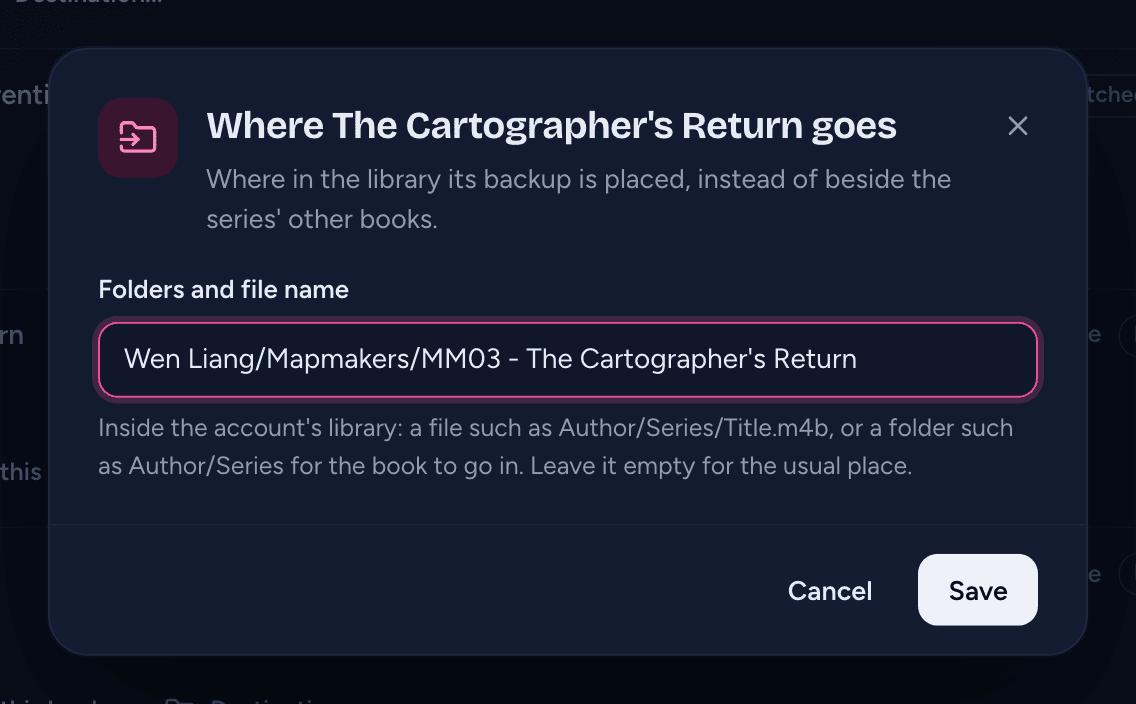
The destination, like the account's template, is read when the backup is queued: changing it later doesn't move a backup that is already waiting.
Back up everything
Back up everything..., on each account's card and at the top of the titles page, backs up the account's books that aren't on this server yet, all at once. It first asks you to confirm, with how many books and about how much space they take, such as "212 books, ~96 GB". The size is an estimate from each book's length; the library needs about that much free space.
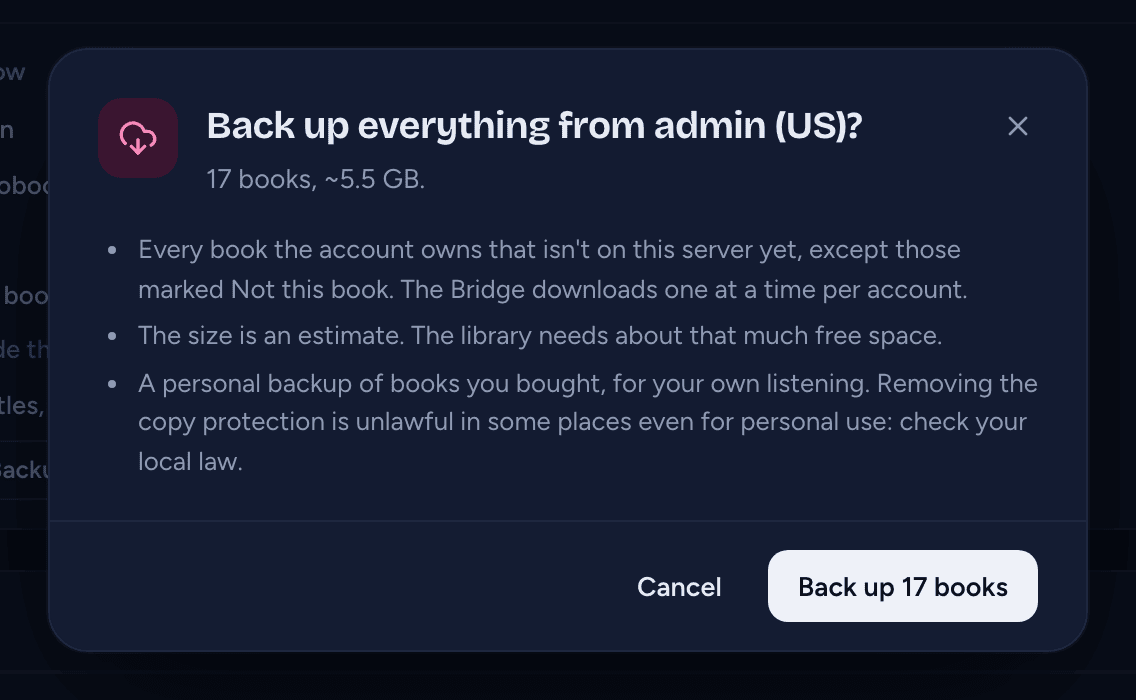
It backs up every title of the account that is Available and not on this server, except:
- titles marked Not this book;
- contested titles (the book is probably here under another title, see How titles are matched);
- titles already backed up, while the backed-up book is still in the library;
- titles with a backup already waiting or running;
- preorders and unavailable titles (a preorder can still be backed up on release, see Preorders).
A backup that failed or was cancelled is tried again. The button is off when there is nothing to back up and while the account is Paused.
Back up N books queues them ("212 backups queued for Chris (US)"). They run one at a time, after anything you back up one by one and after new podcast episodes, so a big library can take days. If the Bridge can't take them (it doesn't run backups, or can't write to the library), nothing is queued and the console says why; with the Bridge offline, they wait for it. It is in the audit log as Backed up everything from an Audible account.
Backing up by itself
Backup settings... on an account's card sets Back up by itself: what the account backs up without being asked, after each check.
| Choice | Backs up |
|---|---|
| Every new book | every book bought from now on |
| New books in series you have | a book bought from now on, when a book of one of its series is already on the server for the account's person (in a library they can see) |
| Only books you choose | nothing by itself: only what you back up from the console |
New purchases only. A policy acts only on titles the Bridge first sees after you chose it. The books the account already had are never backed up by a policy: use Back up everything for those. (For an account you just added, the books found by its first check count as the ones it already had, even if you chose a policy when you signed it in on the Bridge.)
After each check, a policy backs up a new purchase that Back up everything would, but only one never backed up before (a policy never tries one again after it failed: Back up or Back up everything does). It needs an online Bridge that can back up; a check while it can't queues nothing, and the next check asks again.
The choice an account starts with is the one picked when it was signed in on the Bridge. After that it is set here; the Bridge's Accounts tab says so. Saving is in the audit log as Changed an Audible account's backups.
Where backups go
Beside the series' other books. With no template (the card's Placement
says Beside the series' other books), a backup goes where your library keeps
its series, named like the books already there: the same author folder, the
series' folder and its numbering. For example, with book 6 of Dragon Heart in a
DH06 - Land of Magic folder, book 7 goes in a DH07 - ... folder beside it. A
book of a series you don't have yet goes in Author/Series/ with a code made from the series' initials, and a book in no
series in Author/Title/. The file is the title, as Title.m4b.
A placement template. Backup settings... > Placement template names the
folders and file yourself, for example
{Author}/{Series}/{ {PaddedSeq} - }{Title}:
- Variables:
{Author},{Series},{Title},{PaddedSeq}(the number in the series, padded as your folders are),{Narrator},{Year}and{ASIN}, among others. { ... }around part of it is dropped when a variable inside is empty: above, a book in no series has no number and no-.- A last part ending in
.m4b,.m4aor.mp4names the file. Another audio file name (such as.mp3) can't be used: the backup is always an M4B. Anything else is a folder, and the book's file (named after the title) goes in it. - It must stay inside the library: not starting with
/, no.., no part starting with a dot. A template the server can't read (an unknown variable, a{without its}) isn't saved, and the dialog says why.
Leave it empty for the placement beside the series' other books. A title's own destination wins over both. Whatever the placement, folders that already exist are used as the disk spells them, and nothing is ever overwritten.
Preorders
A Preorder can't be downloaded yet. Back up on one remembers it: the title shows Backs up on release, and the request is kept through restarts.
From the title's release date, the server checks the account every hour instead of every 6 hours. The first check that finds it Available backs it up: because you asked, or because the account's policy covers it as a new purchase.
If it still isn't available 14 days after its release date, the title shows Still not released: check it on Audible and the hourly checks for it stop (the account's usual checks go on, and back it up if it does turn up). Audible sometimes moves a release date: check the title in the Audible app or website.
Marking a preorder Not this book drops the request. Back up on a preorder is in the audit log as Asked to back up an Audible book.
Check now
The server asks the Bridge to check each account every 6 hours while the module is on (every hour while one of its preorders is due, see Preorders). Check now asks for a check straight away ("Checking Chris (US)"); if a check is already waiting, it is moved to the front ("Chris (US) is already being checked"). If the last check is still being cancelled, it says so ("The check of Chris (US) is still stopping"): press Check now again once it has stopped. The titles update once the Bridge has finished. A paused account can't be checked: the console says to choose another library on the Bridge's Accounts tab.
Checks are jobs like the Bridge's others: they appear in the Bridge's Jobs list as Checking an Audible library, the scheduled ones marked Scheduled by the server. Only the latest finished check of each account is kept there. With the Bridge offline, a check waits until it is back. Check now is in the audit log as Queued a Bridge job.
Removing an account
The usual way to remove an account is Remove on the Bridge's Accounts tab: it removes it from the Bridge and from this server, cancels its backups that are waiting or running, and removes its AudioSilo device from your Amazon account (see Bridge accounts).
Remove... in the console (on the accounts card, or at the top of the titles page) is for an account the Bridge can no longer remove: one set up by a Bridge you unpaired or replaced, or one whose removal on the Bridge couldn't reach the server. With no Bridge paired the accounts card isn't shown, so use the titles page. Confirm with Remove: the account, its titles and any check waiting for the Bridge go from this server, and its backups that are waiting or running are cancelled. The books already on your server stay, backed-up ones included. It removes the account from this server only: to sign the device out of Amazon, remove it on the Bridge's Accounts page too (or in your Amazon account's device list). It is in the audit log as Removed an Audible account.
If the Bridge still has the account, saving it again there (Change) sets it up on the server again.
When the module is off
Turning the Audible module off hides the Audible page and the accounts card, and the server stops asking for checks and backs nothing up by itself; a check or backup already queued waits until the module is on again. The accounts and their titles are kept, and signing in on the Bridge still works. To remove an account in the console, turn the module on first.