Generating characters and recaps
The community database at meta.audiosilo.app gives many books characters and recaps, but not every book. For one it hasn't covered, your Bridge can write them itself: it transcribes the book (or reads its ebook), has an AI agent read it for the people and the events, checks the result for mistakes and spoilers, and saves it with the book. Some hours later the book's Characters and Recaps tabs appear in the player, with nothing else to do.
Who can, and what it needs
- An admin. Only admins see the button, in the console and in the player. Household members, kids' accounts and demo guests never do.
- A Bridge that is paired and online, with its agent container set up (see Running a Bridge). While the Bridge is offline, or doesn't offer characters and recaps, the button isn't there.
- Community metadata switched on under Server > Settings > Community metadata (see Server settings): generated characters and recaps reach the players the same way the community's do.
- A library the Bridge can write to. It saves the results in the book's own folder, so the library has to show as Ready in Settings > Bridge.
The book doesn't need to be matched with community metadata, or to have an ASIN or ISBN.
Where to start it
- The console's book page. The Community metadata card on a book's page has a Characters and recaps part with Generate characters and recaps. Once a book has generated ones, the button reads Regenerate. A book the community already has both characters and recaps for doesn't offer it.
- A whole series. On Library > Series, a series card has Generate for the series. It checks each book first and queues the ones without recaps, in reading order, the earliest first: books that already have recaps (from the community or generated here) are left out, and so are books already queued and any it couldn't check right now. The dialog says how many it leaves out and why.
- The player. On a book's page in the app or the web player, an admin sees Generate characters and recaps after the other buttons, for a book with no characters or recaps at all. For a book with generated ones, Regenerate characters and recaps is in the book's ⋯ menu. The companion's empty Who's who and Story so far offer the same button.
The confirmation
Pressing the button opens a confirmation with what the run will take:
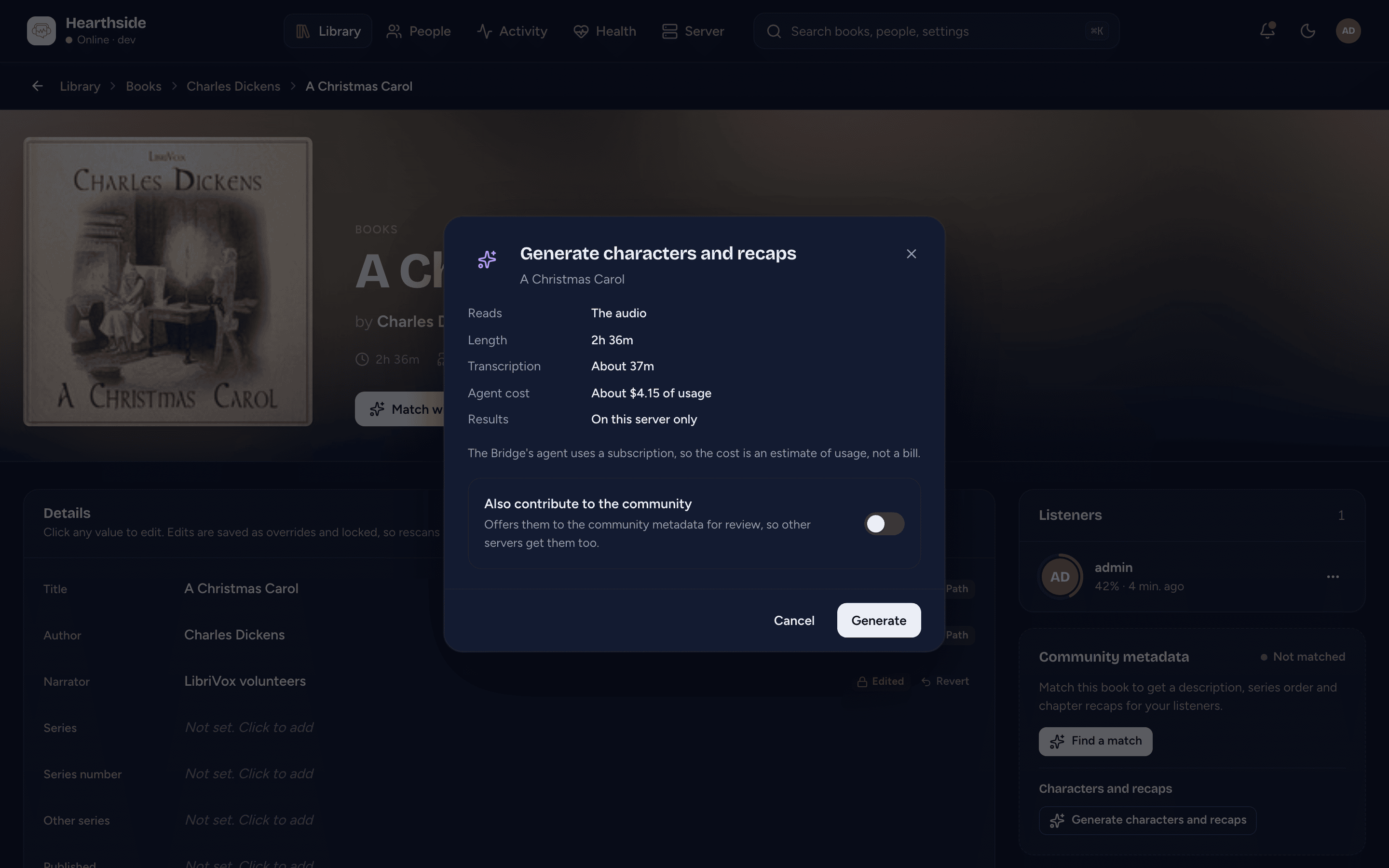
- Reads - The audio, or The ebook beside it with its file name. When
a book's folder holds exactly one
.epubfile (or, for a book that is a single audio file, an.epubwith the same name beside it), the Bridge reads that instead of transcribing the audio, which is much quicker. An ebook it can't read (a copy-protected one, say) is passed over and the audio read instead. - Length - how long the audiobook is.
- Transcription - about how long transcribing takes on your Bridge (None needed for an ebook). Before the Bridge has finished a book it uses a rough guess; after that it learns its own speed.
- Agent cost - what the AI agent is expected to cost, from the books your Bridge has already done. Until it has finished one there is No estimate yet. When the agent runs on a subscription rather than an API key, it reads "About $X of usage": a share of the subscription's limits, not a bill.
- Results - where they will appear (below).
- Also generate for N earlier books in the series first (ticked) - when earlier books of the same series in this library have no recaps yet, they are listed and queued first, because a book's recaps build on the ones before it. The costs above then cover every book the button queues.
The dialog also warns when something stands in the way: the Bridge is offline (what you queue waits for it), the agent isn't ready (the job waits until it is), or the Bridge hasn't reported on its agent yet. When the Bridge can't write to this library, nothing can be queued: check its mapping in Settings > Bridge.
Press Generate (or Generate for N books). The Bridge picks the job up within a few seconds.
Keeping them local, or contributing them
By default the characters and recaps stay on this server only: they are saved with the book and nobody else sees them.
In the console, when the Bridge has been given a GitHub token (see Running a Bridge), the dialog also offers Also contribute to the community. Then, once they are written, the Bridge also offers them to the community database as a submission for review, so every other server gets them too once they are accepted. They are saved on your server either way. Contributing needs the book to have an entry in the community database already; when it doesn't, the job pauses saying so, with the results already saved locally. The player never offers to contribute.
While it runs
Generating takes a while: transcribing a long audiobook can take hours, then the agent reads it in several passes. You can close the page; the Bridge carries on.
- In the console, the book's Characters and recaps part shows the job: its state, what it is doing now ("Transcribing", "Writing characters and recaps", "Checking for mistakes"...), how far it has got, about how long is left and what it has cost so far, with Cancel. The job also appears under Jobs in Settings > Bridge, linked to the book.
- In the player, the same status sits under the book's buttons: "Generating characters and recaps", the step, "12 of 40", "about 2 h left", and Cancel.
The Bridge takes queued jobs in the order they were queued. A later book of a series waits for the book before it to be written first, so its recaps can build on that book's.
When a job pauses
Some problems pause a job instead of failing it. It shows as Needs attention in the console (Generating is paused in the player) with the reason, and Open in the Bridge takes you to that job on the Bridge's own page, where Retry sends it on once you've fixed the cause. Some pauses end by themselves:
| Reason | What to do |
|---|---|
| The agent isn't available | Nothing: the job carries on once the agent container is running and signed in again. Check it if this lasts. |
| The agent reached its usage limit | Nothing: it carries on once the limit resets. |
| The agent's credential was refused | Give the agent container a new token or login (see Running a Bridge). The job looks again by itself every 30 minutes. |
| The job reached its spending limit | The monthly cap carries on by itself on the 1st of next month; raise the cap on the Bridge for sooner (below). |
| The Bridge can't write to this book's folder | Give the Bridge's user write access to the book's folder. It checks again every minute. |
| The community has no entry for this book yet | Only when contributing: add the book to the community database, or cancel and generate it again kept local. Your copy is already saved. |
| The ebook couldn't be read | Cancel, then generate again: it reads the audio. |
| Anything else (the transcript checks didn't settle, the chapters couldn't be matched...) | Look at the job on the Bridge's page, then Retry. |
When the job says when it tries again by itself, the console and the player show that time.
Cancel stops a job at any point. Failed means it couldn't go on, with the reason shown; in the player, Try again queues it afresh.
Being told when it's done
Two events in Notifications cover the Bridge's jobs: A Bridge job finished ("Characters and recaps ready" with the book's title) and A Bridge job failed or needs attention. Pauses that end by themselves (the agent's usage limit, the agent container briefly away) aren't announced. Both show in the console's bell whether or not you send them anywhere.
Where the results appear
When the job is done, the book gets its Characters and Recaps tabs in the player, and the companion's Who's who and Story so far fill in. They work exactly like the community's, spoiler protection included (see Recaps and characters), with two differences:
- A small Generated on this server mark heads each tab whose content your Bridge wrote.
- There is no community credit line under them: they aren't the community's.
The community's always comes first. If the community database has characters but no recaps for a book, say, the player shows the community's characters and your generated recaps. Once the community has both, your generated ones are no longer shown (and the console no longer offers the button), though they stay in the book's folder.
The files live in a hidden .audiosilo folder inside the book's folder:
characters.json, recaps.json and bridge.json (what made them, and when).
For a book that is a single audio file, they sit in a .audiosilo folder beside
it, named after the file (The Book.characters.json). The server never shows that
folder as a book or plays anything from it, and its next scan picks up any change
to the files. Moving the book's folder takes them along. Regenerate
replaces them.
The current apps and web player show generated characters and recaps for every book. An app version from before this feature shows them only for a book that is matched with community metadata, without the mark.
Costs and the monthly cap
The transcription runs on your Bridge's own computer and costs nothing but time. The AI agent is the cost: it runs on the account the agent container is signed in with, the Bridge's own (see Running a Bridge). With a subscription login the cost is notional (it counts against the subscription's usage limits); with an API key it is billed per use.
Two limits keep it in check, both set on the Bridge (see its settings):
- A monthly cap, $100 by default, across every book. A job that reaches it pauses and carries on by itself on the 1st of the next month (the month is counted in UTC). It can be raised, or turned off.
- A cap per book, $75 by default.
Settings > Bridge in the console shows the Bridge's agent and whether it is ready, whether it is Paid by a subscription or an API key, what This month has cost against the cap, and how many finished books the estimates come from. The Bridge's own page shows the same on its Status tab.
Transcripts
The Bridge keeps a book's transcripts in its own data folder for 30 days
after its job ends, then deletes them. They never go into your library and are
never contributed. What a later book in the same series builds on (the facts and
the spelling of names) is kept. On the Bridge, transcripts.retention_days sets
the number of days; 0 deletes them as soon as the job ends.
Where to next
- The Bridge - the console's Settings > Bridge.
- Running a Bridge - setting up the Bridge and its agent container.
- Recaps and characters - how listeners see them.