Importing from Audiobookshelf
If you are moving from Audiobookshelf, Server > Settings > Import in the admin console copies each person's listening history over, so their stats, calendar, streaks and year in listening carry on from where they were rather than starting at zero.
Only admins can import. AudioSilo only reads from Audiobookshelf and changes nothing there. You review each person's import before anything is written, and an applied import can be undone.
What comes over
For each person you import:
- Their listening sessions on books, with the real dates and times they happened and the device Audiobookshelf recorded. Sessions older than Days to keep sessions (400 by default) go straight into daily totals, as the server does with its own old sessions: they count in the totals, the day-by-day charts and the book's history like the rest, but not in the Sessions list or by time of day.
- How far they got in each book, and when they started and finished it. Progress only ever moves forward: an import never rewinds a book or marks a finished book unfinished, and it moves a book on only where Audiobookshelf's progress is newer than what is saved here.
- Their bookmarks, leaving out ones they already have here (the same book, the same text, within two seconds).
- An estimate where Audiobookshelf's progress goes further than its sessions explain (for example where sessions were deleted in Audiobookshelf). Estimates of 5 minutes or more are kept, and they count like the estimates from before AudioSilo recorded sessions: in the totals and top lists, not in the day-by-day charts. A book that was only marked finished in Audiobookshelf, with no listening sessions there at all, gets no estimate: it comes over as finished, without counting the whole book as listened.
What doesn't come over:
- Podcasts. Only books are imported.
- Books that aren't in your AudioSilo libraries, or that the person can't listen to here. The review lists them, with the reason (see Books that didn't match).
- Collections, playlists and anything else that isn't listening. Accounts and passwords stay as they are on both servers.
- Sessions from after the cutoff. By default that is when each person started using AudioSilo, so nothing is counted twice (see The cutoff: nothing counted twice).
Before you start
- Everyone needs an AudioSilo account. Invite them first. When the usernames are the same on both servers, AudioSilo picks the right person for you.
- Your books need to be in an AudioSilo library. Matching works best when AudioSilo reads the same folders as Audiobookshelf (see How books are matched).
- An API token from Audiobookshelf. In Audiobookshelf, open
Settings > Users, choose your account and copy its API token (newer
versions also have Settings > API Keys). The token decides whose history
you can import:
- an admin or root account's token (or an API key acting as one) lists every Audiobookshelf user, so you can import the whole household at once;
- a regular user's own token imports only that user.
- The Audiobookshelf address, as the AudioSilo server sees it. The
AudioSilo server fetches the history itself, not your browser, so the
address has to work from the machine AudioSilo runs on.
localhostworks only when both run on the same machine (and not in separate containers). If both run in the same Docker Compose project, use the service name and the port inside the container, for examplehttp://audiobookshelf.
Step 1: connect
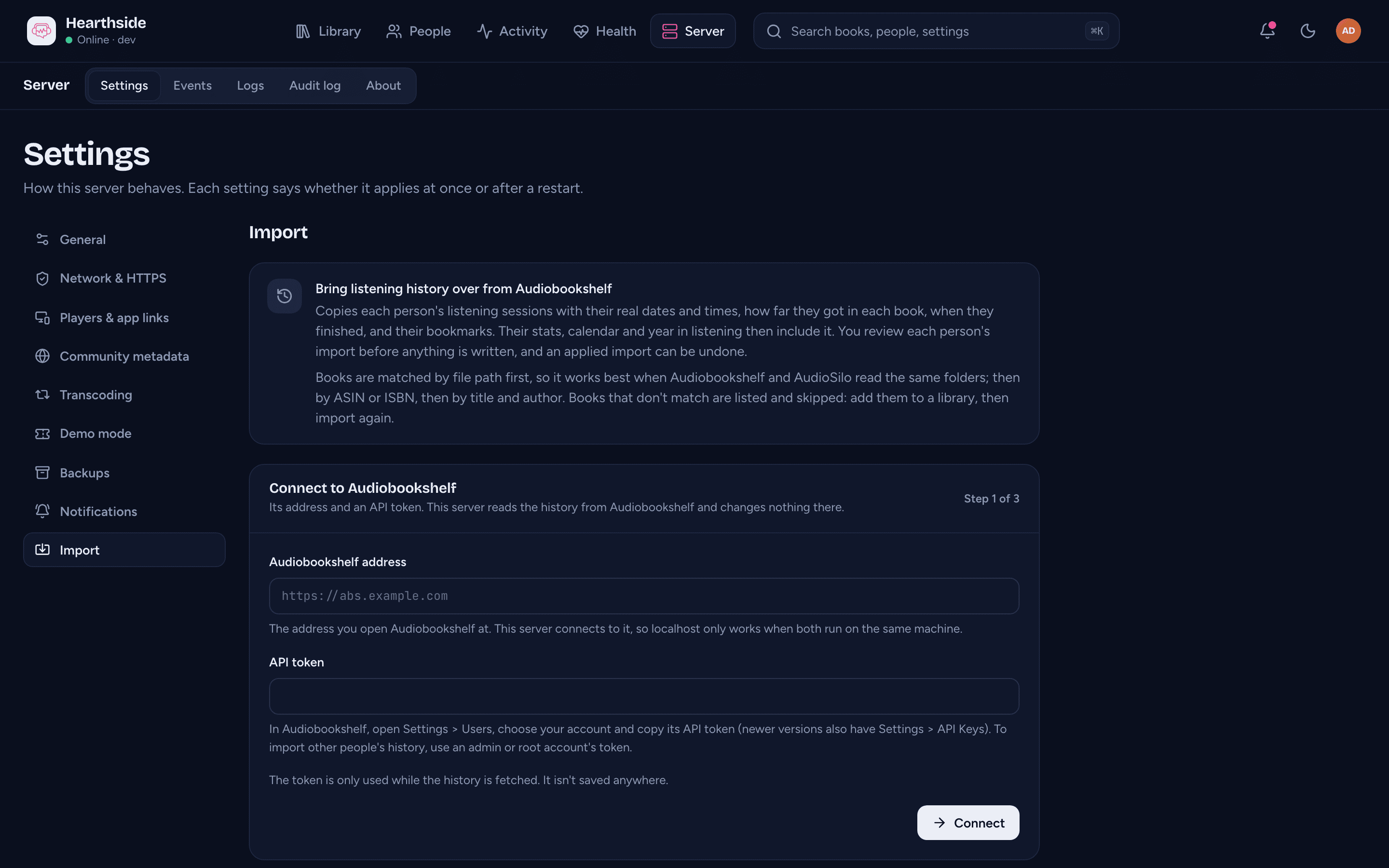
Open Server > Settings > Import (or type "audiobookshelf" in the command palette). In Connect to Audiobookshelf, fill in:
- Audiobookshelf address - the address you open Audiobookshelf at, starting
with
http://orhttps://. - API token - the token you copied.
Press Connect. AudioSilo first checks that the address really is Audiobookshelf (without sending the token), then that the token works, and lists its users. If something is wrong, the reason shows under the field:
- "This server couldn't reach that address" - Audiobookshelf isn't running, or the address doesn't work from the AudioSilo server (see above).
- "Something answered at that address, but not Audiobookshelf" - use the address you open Audiobookshelf at.
- "Audiobookshelf refused this token" - copy it again; to import other people, use an admin or root account's token.
Step 2: choose whose history goes where
Choose whose history goes where lists the Audiobookshelf accounts the token can read, each with its Audiobookshelf type (root, admin, user or guest). For each one, pick the AudioSilo person under Import into, or Don't import. Accounts with the same username as someone here are already filled in. Each AudioSilo person can take the history of one account only.
Then choose Which listening to import:
- Before each person started using AudioSilo (recommended) - skips everything from after their first listening here, so nothing they played on both servers is counted twice. For someone who hasn't listened here yet, this imports everything.
- Everything - every session Audiobookshelf has, even from after they started here.
- Before a date - only sessions that started before the day you enter under Import sessions before (from the start of that day, in the server's time).
Press Fetch history for 1 person (or n people). Back returns to the first step; the address is kept but you need to paste the token again.
The history is fetched in the background, one import per person. A long history can take a minute, and you can leave the page meanwhile. Nothing is written yet.
Step 3: review and apply
Each import appears under Imports to review, as "Audiobookshelf user → person" with its status: Fetching, then Ready for review (or Failed, below). A ready import shows what it would add:
- the hours of listening to import;
- Sessions and their Dates (the first and the last);
- Books matched, out of the Audiobookshelf books the person has any history for, and how they matched ("by path", "by ASIN", "by ISBN", "by title and author");
- Finished books, Books with progress (books whose progress is created or moved on) and Bookmarks;
- Estimated listening and Sessions after the cutoff (skipped), when there are any;
- "n books not matched", which opens the list of books that will be skipped, most listened first, each with the reason and how long the person listened to it in Audiobookshelf.
Below the figures is the cutoff ("Sessions from before date" or "All sessions, whenever they were"); Change lets you pick another before you apply.
When it looks right, press Apply for person and confirm with Apply import. It is written in one go: a toast says "History imported for person", and the import moves to Past imports. If the server stops while an import is being applied, nothing of it is written and it goes back to Ready for review.
Discard drops an import you don't want. Nothing was written, so it doesn't ask first; you can always fetch it again. If nothing matched, or the cutoff skips every session, the card says "Nothing to import" and can't be applied.
When a fetch fails
A failed import says why, and what to do:
| What it says | What to do |
|---|---|
| Could not reach the Audiobookshelf server (or Audiobookshelf took too long to answer) | Check Audiobookshelf is running and the address works from the AudioSilo server, then import again. |
| Audiobookshelf refused the API token | Use an admin or root account's token, then import again. |
| That address is not an Audiobookshelf server | Check the address, then import again. |
| The server stopped while this import was fetching | AudioSilo was restarted mid-fetch. Nothing was written: import again. |
| Audiobookshelf sent something the import could not read (or just "The import failed") | Nothing was written. Try again; the server log has the details. |
Discard the failed import and start again from step 1. Each person can have only one import being fetched or applied at a time.
How books are matched
Each Audiobookshelf book the person has history for is matched to a book here, trying the strongest evidence first:
- The path. Most people point both servers at the same folders, so the
book's folder (or file) names it. Paths are compared from the end, so it
still works when the two see the folders at different places (Audiobookshelf
at
/audiobooks/Author/Book, AudioSilo at/books/Author/Book) or when the libraries are rooted at different depths (one library at an author's folder, the other at the folder above). A book one server keeps as a folder and the other as the single file inside it matches too. - The ASIN, then the ISBN, from Audiobookshelf's details and AudioSilo's.
- The title, author and series, among the books here by the same author.
The path and title matches also check that the two lengths agree (within 5%, plus 2 minutes), so a different edition or a part of a book isn't mistaken for the whole. A book that was deleted from Audiobookshelf but still has sessions is matched by its ASIN, ISBN or title, as the sessions recorded them. When it matches the same book as one still in Audiobookshelf (say the book was removed and added again), both are used and their sessions are combined.
Books that didn't match
Each skipped book in the review says why:
| Reason in the review | What to do |
|---|---|
| Not found in your libraries | Add the book to a library (ideally the folders Audiobookshelf reads), or check its title and author match, then import again. |
| Two Audiobookshelf books matched the same book here, so neither was used | Audiobookshelf has two books that both look like this one (a duplicate copy, or two items with the same ASIN), each with its own progress. Neither is used, because one of them would be wrong. Tidy up the duplicate, then import again. (Books deleted from Audiobookshelf don't count here: their sessions join the book's.) |
| Found, but person can't listen to it here | The book is here, but the person has no access to it. Give them access, then import again. |
| Its discs are separate books here; join them in Library health, then import again | AudioSilo reads this book as one book per disc folder, so its history can't be divided between them. Use Join into one book in Library health, let the library rescan, then import again. |
"Import again" means starting a new import for that person from step 1. It replaces the previous one (see Importing again), so books fixed since are added without counting anything twice.
The cutoff: nothing counted twice
Someone who used both servers for a while has the same listening recorded twice, once in each. The cutoff stops that: sessions that started at or after it are skipped, and the review counts them under Sessions after the cutoff (skipped). With the recommended choice, each person's cutoff is the moment of their first listening recorded here.
The cutoff applies to sessions and estimates. Progress and bookmarks come over whatever the cutoff, because progress only ever moves forward and bookmarks already here are never duplicated.
To change it during review, press Change under the figures, choose Before each person started using AudioSilo (recommended), Everything or Before a date (the start of that day, in the server's time; the console shows the cutoff in the server's time too, wherever your browser is), and press Recount. The figures are worked out again from what was already fetched; nothing is fetched again.
Importing again
Applying a new import for someone replaces their previous Audiobookshelf import: its listening is taken out first, in the same step, so nothing is counted twice. The confirmation says so ("This replaces the Audiobookshelf history imported for person on date"), and the older import shows as Undone in Past imports. This is how you bring in books you have fixed since the first import.
Undoing an import
Past imports, under the review cards, lists every applied and undone import. Undo on an applied one asks first ("Undo the import for person?"); Undo import then removes the sessions, estimates and bookmarks it added, and puts the person's progress back where it was before the import. Progress the person has changed since (they kept listening, or an admin edited it) is kept as it is now, and so is an imported bookmark they have edited or labelled since: it becomes theirs.
An undone (or failed) import can be removed with Delete. An applied import can't be deleted; undo it first.
A person's page shows their imports too: the Listening tab has an Imported history card with each import and its Undo, and Import settings opens Server > Settings > Import. See A person's page.
Where imported listening shows
Imported sessions count like listening recorded here, on the days and at the hours they happened:
- In the person's app: their listening stats (time listened, streaks, the calendar and their year) include it, and each imported session also shows as a stretch of listening in the book's History tab and the Journal's Diary.
- In the admin console: Activity (the Overview, Year in listening) and the listening year on the person's page. In Activity > Sessions and a person's recent sessions, an imported session shows the device Audiobookshelf recorded, with "Imported from Audiobookshelf" under it. The list is in the order the sessions started, so imported ones sit among the rest by their dates.
- Not in the apps in use or the playback (Direct or Transcode) breakdowns: Audiobookshelf didn't record how a session played.
Imported sessions follow the same keeping time as any other: sessions older than it (400 days unless you changed it) are reduced to daily totals at the server's next daily tidy-up. They still count in the totals and charts, and an undo still removes them, but they no longer appear in the Sessions list.
Starting, applying and undoing an import are recorded in the audit log.
Privacy and the token
- The token is never stored. It is used only while the history is fetched, held in the AudioSilo server's memory, and never saved, logged or shown again. If the server restarts mid-fetch, the import fails ("The server stopped while this import was fetching") and you start again with the token.
- Audiobookshelf is only read. AudioSilo makes no changes there.
- The fetched history is kept only while the import waits for review (the books the person has history for, their sessions, progress and bookmarks; never the token), so a cutoff change or the apply doesn't fetch again. It is removed once the import is applied, undone or deleted; what was applied lives on as the person's listening.
- The AudioSilo server connects to the address you give, from wherever it
runs. Redirects are followed only on the same host, and never from
httpstohttp.
Where to next
- Activity - where the imported listening shows up.
- People and invites - accounts for everyone you import, and each person's Listening tab.
- Sharing - giving someone access to books that came up as "can't listen to it here".