Making a read-along
A read-along lines a book's ebook up with its narration, sentence by sentence: for every sentence of the text, it knows where in the audio it is spoken. Your Bridge makes it from the book's audio and the ebook beside it, using speech recognition only, with no AI agent and no agent cost, and saves it with the book.
What it needs
- An admin, in the console (or in the player, below).
- A book with an ebook. The ebook is the EPUB the player's Read the ebook opens: the book's page shows an Ebook chip for one. It has to be DRM-free, and the same book as the narration, ideally the same edition.
- A Bridge that is paired and online, version 0.5.0 or newer (the Bridge that ships beside AudioSilo 2.5.1). An older Bridge, such as 0.4.0, can't make read-alongs: the card says so (the card's Bridge lines) and offers no Make read-along. Update it as in Running a Bridge.
- A library the Bridge can write to, since the read-along is saved in the book's own folder: the library shows as Ready in Settings > Bridge.
Community metadata, a match and the agent container are not needed.
The Read-along card
Open the book in Library > Books. Under Chapters, a book with an ebook has a Read-along card: "Listeners follow the narration in the book's ebook, sentence by sentence."
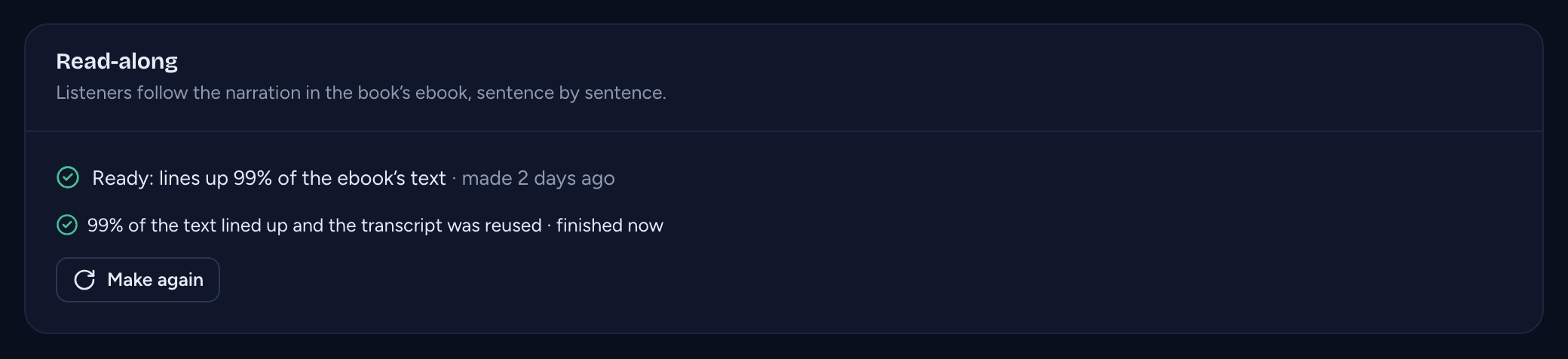
It says where the book stands:
| The card says | Means |
|---|---|
| No read-along yet. Listeners can read the ebook, but not follow the narration in it. | none has been made; Make read-along makes one |
| Ready: lines up 99% of the ebook's text · made 3 days ago | it fits the book as it is now. Make again makes it afresh |
| Out of date: the ebook changed since the read-along was made. | the EPUB was replaced or edited. Listeners don't see it until it is made again |
| Out of date: the audio files changed since the read-along was made. | the book's audio files were added, removed, renamed or re-encoded. Listeners don't see it until it is made again |
The card shows only for a book with an ebook, and only when there is something to show: a read-along, a job, a Bridge that can make one, or a line about the Bridge (below). The percentage is rounded down, so a read-along that lines up 99.6% of the text says 99%. Under a ready read-along, the job that made it shows only when it adds something ("the transcript was reused"); under one that is out of date, it doesn't show.
When Make read-along can't be offered because of the Bridge, the card says why where it matters: for a read-along that is out of date, after a job that failed, and for a Bridge too old to make one. Each line links to Settings > Bridge:
| The line says | Means |
|---|---|
| Making a read-along needs a Bridge. Set up a Bridge | no Bridge is paired with the server |
| The Bridge is offline: make the read-along once it's back. Bridge settings | the paired Bridge isn't reaching the server |
| This Bridge can't make read-alongs. Update it to 0.5.0 or newer. Bridge settings | the Bridge is online, but a release from before read-alongs |
Making one
Click Make read-along (or Make again). The confirmation says what will happen before anything starts:
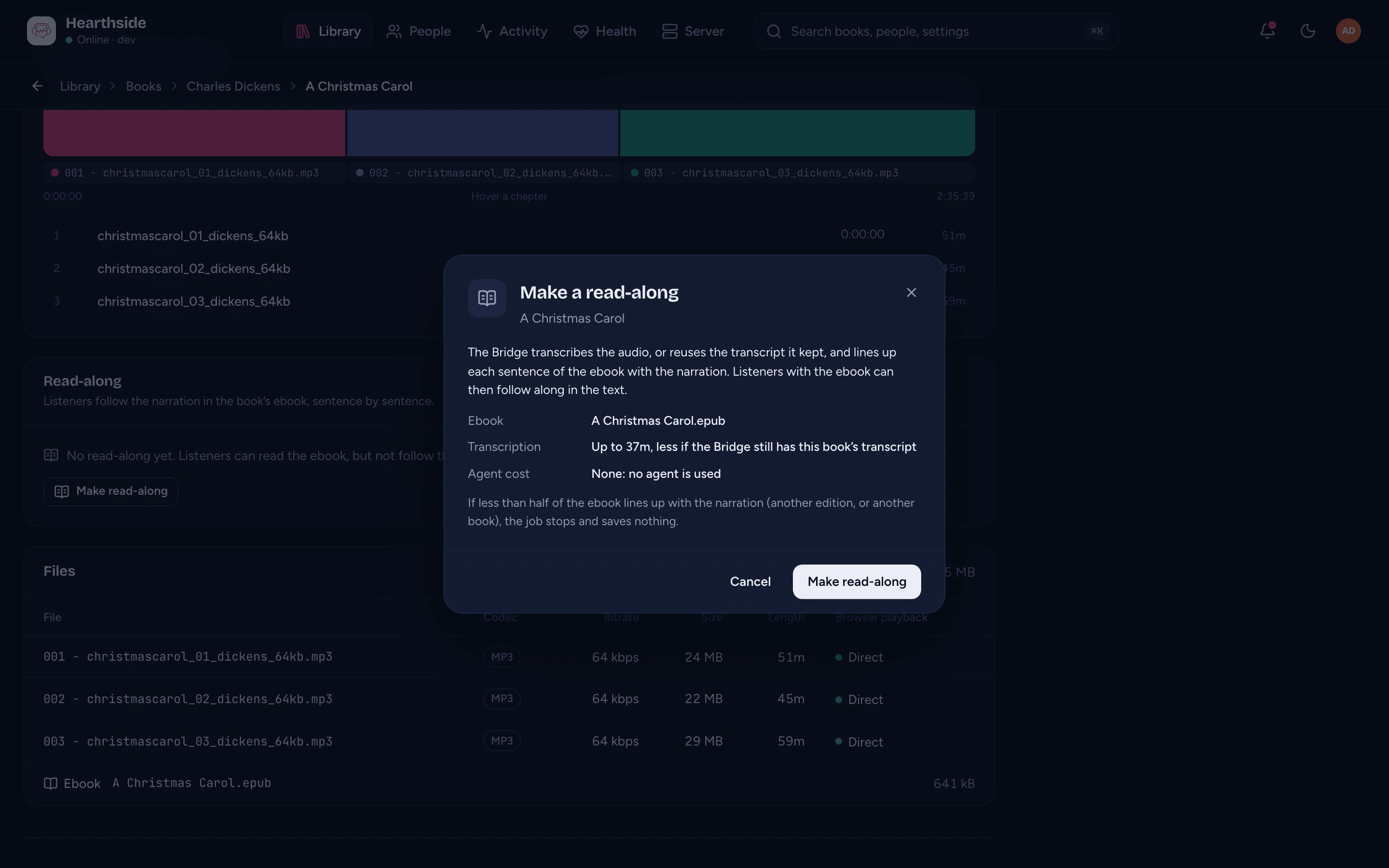
- Ebook: the file it lines up.
- Transcription: "Up to" how long transcribing the whole book takes on your Bridge, "less if the Bridge still has this book's transcript" (see How long it takes).
- Agent cost: "None: no agent is used".
- For Make again over a ready read-along, when the one it replaces was made. The dialog's button then says Make again too.
- That if less than half of the ebook lines up with the narration, the job stops and saves nothing.
When the Bridge can't write to the book's library, the dialog says so, and nothing can be queued. If the Bridge goes offline while the dialog is open, it says so too (a job queued then waits for the Bridge), and if a Bridge that is too old to make read-alongs takes its place, it shows The Bridge is too old for read-alongs, saying which version to update to, and nothing can be queued. Press Make read-along: a toast says it is queued, and the Bridge picks it up within a few seconds.
Read-alongs are made one book at a time; there is no "make read-alongs for every book" action.
From the player
As an admin, you can make one from the player too. Play the book and open the companion's Text tab. Where there is nothing to follow yet it says No read-along for this book yet, with Make read-along; where the read-along is out of date it says The read-along is out of date, why (the ebook or the audio changed), and Make the read-along again.
The button opens a confirmation:
- what the Bridge reads (the ebook and the audio);
- Up to how long transcribing the whole book takes on your Bridge, less when it still has the book's transcript (no estimate when the Bridge hasn't sent its figures);
- AI agent cost: None: no AI agent is used, and where the result appears (on this server).
Press Make read-along to queue it: "Queued. The text appears here when it's done." The tab then shows the job's progress ("Making the read-along", with Cancel) and, when it's done, the text. The Bridge can't make one while it's generating characters and recaps or finding the chapters of the same book, so the confirmation says to wait (see Sharing the Bridge's work).
How long it takes
Most of the time is speech recognition, as when generating characters and recaps: the Bridge (or an ASR worker) transcribes the book, then transcribes again any chapter where the recognition repeated itself. Lining the text up and fine-tuning each sentence's start take minutes on top.
The Bridge keeps a book's transcripts for 30 days after its last job. A book whose audio it transcribed recently, for characters and recaps, for Detect chapters or for an earlier read-along, isn't transcribed again: making its read-along takes minutes, not hours. Each read-along restarts those 30 days.
While it runs
The card shows the job: its step ("Transcribing", "Lining up the ebook with the narration"), how far it has got and the time left, with Cancel. The job also shows as Read-along in Settings > Bridge > Jobs. If it pauses (the Bridge can't write to the book's folder, say, or is waiting for an ASR worker), the card says why, with Open in the Bridge (see When a job pauses).
When it finishes, the card shows the new read-along, and the job says how much of the text lined up ("99% of the text lined up"), and "the transcript was reused" when nothing had to be transcribed. With notifications on, you hear "Read-along made: the book's title (99% lined up)", and the console's bell says "Read-along made for the book's title": "99% of the text lined up. Listeners can follow along once the player supports read-alongs."
How much lines up, and a poor match
The percentage is the share of the ebook's text, counted from the first sentence the narrator reads to the last, that was found in the narration. A copyright page, a table of contents or an afterword nobody reads doesn't count against it. With the right edition of the ebook, it is usually well over 90%.
Less than half is refused. When under 50% of the text lines up, the ebook and the narration aren't the same book, or are very different editions. The job fails and nothing is saved. The card and the job in Settings > Bridge say "The ebook and the narration don't match: only 23% lined up. Use the EPUB of the same edition as the audiobook, or check it's the right book, then make it again." Nothing is saved because a read-along that is mostly wrong would only send listeners to the wrong place. Put the matching edition's EPUB beside the audio and make it again; the transcript is reused.
Other reasons a job fails, each said in the job:
- "This book has no ebook": the ebook is gone, or the server no longer counts one (two EPUBs in the folder count as none);
- the ebook is DRM-protected, isn't a readable EPUB, or is over 256 MiB;
- "The ebook changed while aligning; run it again": the EPUB was replaced while the job ran.
When a read-along goes out of date
A read-along belongs to one ebook and one set of audio files. When you replace or edit the EPUB, or change the book's audio (add or remove a file, re-encode or trim one), the card says it is Out of date, and listeners don't get it. Click Make again. When only the ebook changed, the transcript is reused, so it takes minutes. Moving or renaming the book's folder doesn't make it out of date.
Sharing the Bridge's work
Making a read-along, generating characters and recaps and detecting chapters all start from the book's transcript, so the Bridge runs one of them at a time for a book:
- While characters and recaps are being generated, or chapters found, the Read-along card shows that job instead of Make read-along ("Make the read-along once that has finished: it reuses the transcription").
- While a read-along is being made, the book's Generate characters and recaps waits the same way, and Detect chapters passes over the book.
- Generating characters and recaps while a read-along job is paused cancels the read-along ("make the read-along again after"). Generating picks up the read-along's transcription only when the read-along had finished and was waiting to save; otherwise it transcribes the book itself. The read-along you make after reuses generating's transcription.
- Characters and recaps generated from the ebook are never disturbed by a read-along or by Detect chapters: the book keeps its characters, recaps and description as they were, and generating again from the audio later reuses the read-along's transcription.
Where it is saved
In the book's hidden .audiosilo folder, beside the characters and recaps the
Bridge writes: readalong.json for a book in its own folder, or
<file name>.readalong.json for a single-file book. The server only reads it.
Deleting the file removes the read-along at the next scan.
Where to next
- The Bridge - the console's Settings > Bridge and its jobs.
- Generating characters and recaps - the Bridge's other book jobs.
- Reading the ebook - which books have an ebook, and reading it in the player.