Podcasts
What is available now
Podcasts need a Bridge and the Podcasts module, enabled in Server > Settings > Modules. The Bridge reads feeds, saves show details and artwork, downloads episodes and removes eligible older downloads. The server reads what the Bridge saves.
The AudioSilo app shows podcast libraries from version 2.4.0: the shows, each show's episodes, following, a New episodes shelf on Home and playing episodes, including ones the Bridge downloads when someone presses Play. Listeners can also add shows themselves (directory search, a feed address, an OPML list from another app), export the shows they follow and ask a show to check for new episodes (see Podcasts in the listening guide). Older app builds don't show podcasts at all, even to an admin: update the app. The web player your server serves is the one built into it, so it shows podcasts once the server is up to date.
The console has no screen for following shows, searching directories or OPML: use the player (signed in as yourself) or the developer API.
This release downloads episodes according to each show's retention policy, when an admin requests one through the API, or when a compatible client asks to play an episode whose audio is missing. It also saves supported MP3 chapter markers, and it can search podcast directories and import or export OPML subscription lists. External chapter files and transcripts arrive later.
Set up a podcast library
- Run and pair a Bridge, version 0.3.0 or later (which Bridge version).
- In Library > Libraries, press Add library. Choose Podcasts under Kind and give it a name and a folder. The hint under Kind says what podcasts still need on your server (the Podcasts module, a Bridge that supports podcasts, or both), or that they are ready.
- Leave Give everyone access ticked (it is by default) so every listener on the server can follow shows in the new library, then add it. Untick it to choose who gets it yourself, later, in People: until then only admins see the library. It gives access to each listener's own account; household members get it through their owner, and the demo account is left out. If it can't give someone access, a message says so ("Couldn't give 2 people access") and the library is still added: give them access from their page in People.
- Mount that same folder read-write in the Bridge. The server can keep its read-only mount. Check that the library becomes Ready on Server > Settings > Bridge.
- Turn on Podcasts in Server > Settings > Modules. It starts off, and pairing a Bridge does not turn it on. Its card needs an online Bridge that supports podcasts.
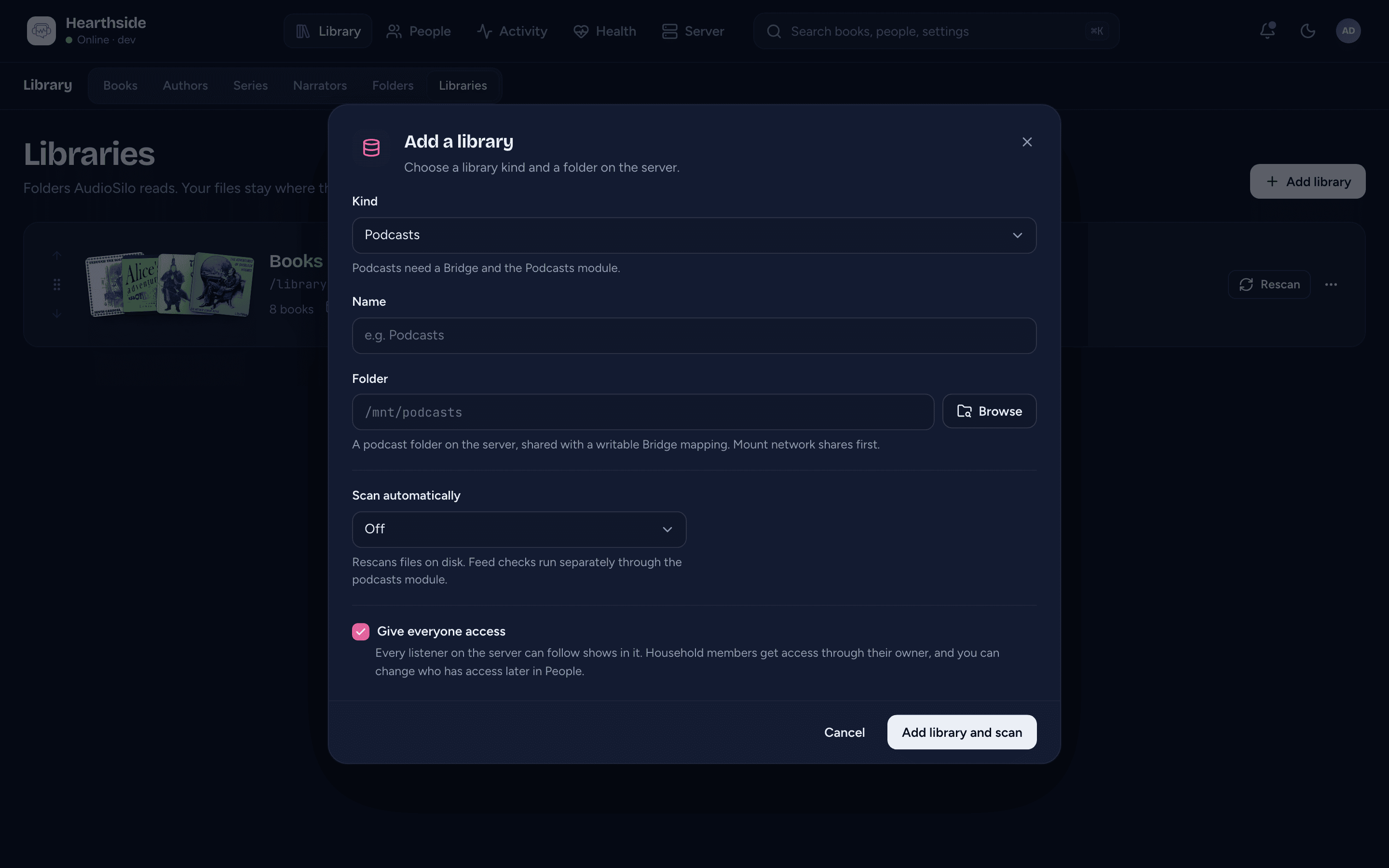
Use a folder of its own. A podcast library's folder cannot be the same as, inside, or around another library's folder. Kind is fixed when you add a library; you cannot turn an existing books library into a podcast library.
An empty podcast library can become ready: the Bridge writes a small marker inside it and asks the server to read it back. It does not need a sample book. See Checking the libraries. A feed on your own network is blocked unless you allow its address range on the Bridge.
The Bridge creates one folder per show, with its feed details and artwork. Leave those folder names alone: episode addresses include the show folder, so renaming one by hand breaks the saved paths. Podcasts stay out of book search, recently added books, author and series lists, and the console's book tools, including the library filter on the Library screens and the library pick in Match automatically and Clear community matches.
Downloads and retention
An admin sets retention per show through the API for now. There is no retention control in the console or released player apps. Everyone following a show shares that policy and the same downloaded files.
The default is Keep 3, with older downloads eligible for deletion seven days after every current follower has finished. The grace period starts at the later of the last follower finishing and the latest download. Downloading an episode again gives it a fresh grace period.
| Policy | Downloads | Deletes |
|---|---|---|
Keep N (keep) | The newest N episodes still listed in the feed | Only outside that window, after everyone finishes and the grace period ends |
On demand (on_demand) | Fetches on play, with at most one queued episode prepared ahead; an admin can also request one | After everyone finishes and the grace period ends |
Archive (archive) | All episodes still listed in the feed, oldest first | Never |
Policy-selected downloads and retention checks require at least one current follower with access. With no followers, files stay in place and the policy's automatic downloads stop. Playing an episode, preparing the next one in a listener's queue and admin downloads through the API still work.
Keep N is a download window, not a disk limit. One follower who never listens can keep files indefinitely. An episode is also protected while anyone has made that episode a favourite, has it in their queue, is playing or downloading it from the server, or while its Bridge download job is open. Making the show folder a favourite does not protect every episode.
Deleting removes the episode's audio and its chapter file, keeping the episode listing, artwork, follows, listening progress and bookmarks. An episode removed from the publisher's feed is not downloaded automatically, but a saved copy remains playable by a compatible client. Once downloaded, an episode is not replaced if the publisher changes its audio. If a later download has different audio, saved listening positions stay unchanged and may no longer line up.
Set a show's policy
Use an admin API key as TOKEN, your server address as SERVER, the library's
numeric id in the URL, and the show's folder name as path. Here the folder is
Example Show. These calls read the policy, set Keep 3 with seven days' grace,
then reset the show to the default:
SERVER="http://localhost:8080"
TOKEN="your-admin-api-key"

curl --get "$SERVER/api/v1/admin/libraries/3/podcasts/retention" \
  -H "Authorization: Bearer $TOKEN" --data-urlencode "path=Example Show"

curl -X PUT "$SERVER/api/v1/admin/libraries/3/podcasts/retention?path=Example%20Show" \
  -H "Authorization: Bearer $TOKEN" -H "Content-Type: application/json" \
  -d '{"mode":"keep","keep":3,"days":7}'

curl -X DELETE "$SERVER/api/v1/admin/libraries/3/podcasts/retention?path=Example%20Show" \
  -H "Authorization: Bearer $TOKEN"
GET and PUT return {"retention":{"mode":"keep","keep":3,"days":7}};
DELETE returns an empty 204 response. Set mode to archive or on_demand
for the other policies. Every PUT must include all three fields: keep from
1 to 1000 and days from 0 to 365, even when a policy does not use them.
Changes are saved immediately; downloads and deletions happen in background
jobs. Saving or resetting a policy needs the module on and an online Bridge
with a writable mapping. Reading it does not.
To request one episode, use its full path: the show folder, a slash and the
episode's file name, as each episode's path in the show folder's feed.json.
(The API's episode listing hides podcasts from tools that don't identify as a
supported client, so a plain curl call there does not show them.)
curl -X POST "$SERVER/api/v1/admin/libraries/3/podcasts/fetch" \
  -H "Authorization: Bearer $TOKEN" -H "Content-Type: application/json" \
  -d '{"path":"Example Show/2026-10-19-3fa94c0b1d.mp3"}'
This returns 202 with a job id and state, or 200 {"downloaded":true} when
a valid saved copy already exists. A new download needs the module, an online
Bridge and a writable mapping. See the
API reference for the
full contract.
Playing an episode that isn't downloaded
When a compatible client (the player from 2.4.0) asks to play an episode whose audio is missing, the Bridge fetches it and the player shows Getting this episode until it is ready. Requests for the same episode share one download, and closing a request does not cancel it. Until the audio is saved, the client is told to try again shortly. Playback requests go ahead of waiting admin and scheduled downloads, and an up-to-date Bridge keeps one download slot free for them.
The server can also prepare the next podcast episode in that listener's queue. This does not download the rest of an On demand show's feed. Each non-admin listener can have at most five open episode fetches they started, including queue preparation; admins are exempt. Joining a fetch someone else started does not count. This is separate from the five follow requests.
A new fetch needs the module on, an online Bridge and a writable mapping. When one is missing, or a download fails, the client is told why. After a failed download, playing the episode again does not start a new download for a while (30 minutes at first, longer after repeated failures), and policy downloads try again only after that wait. An explicit Retry can try sooner. See the API reference for the details. A saved episode stays playable through a compatible client while the Bridge is offline or the module is off.
Space and availability
The Bridge caps each episode at 1024 MiB by default, separately from feed
sizes. Set podcasts.max_episode_mb in its configuration or
AUDIOSILO_BRIDGE_PODCASTS_MAX_EPISODE_MB in its environment to an integer
from 1 to 4096 MiB, then restart the Bridge. An oversized or invalid download
does not become a saved episode.
Downloads are staged inside the show folder, so leave free space on the library's filesystem for downloads in progress as well as saved episodes. Plan space for protected episodes, and for the whole back catalogue when choosing Archive.
Following and feed checks
An adult with access to the whole podcast library can follow a feed by its URL, in the player's Add shows page or through the API. In the player (2.4.0 and later), anyone but a kid's account or the demo can follow a show already in the library from its page, add shows and press Check for new episodes on a show they follow, while the module is on and the Bridge is online. Following a visible show already in the library is immediate; a new feed waits for the Bridge to validate and save it. Following also lets the server schedule downloads selected by the show's policy. Each person can have at most five follow requests open at once. Kids and demo accounts cannot follow, unfollow or ask for a feed check.
The server schedules checks while at least one person follows a show. The Bridge checks recent shows more often and quiet shows less often, and respects the feed's cache instructions. A feed that says it is permanently gone stops automatic checks. Repeated failures make checks less frequent. Routine checks are left out of the console's default Bridge job list, and podcast jobs do not send finished or failed notifications.
Turning the Podcasts module off stops following, unfollowing and checking, automatic feed checks, downloads and retention scheduling. Work the Bridge already holds may finish. It leaves the indexed shows and files in place; reading them through a compatible client does not need the module or an online Bridge. In the player, the Follow button disappears (a followed show keeps a Following badge) and episodes already on the server still play.
Finding shows and moving subscriptions
The server can search public podcast directories and read or write OPML, the file podcast apps use to move a list of subscriptions. Listeners use them from the player's Add shows page and the Shows ... menu (see Adding shows); they are also in the developer API. The console has no screen for them. Kids and demo accounts cannot search or import.
Searching podcast directories
Search is on once the Podcasts module is on. Search works without a
Bridge; following a show that is new to the library still needs one. It
searches Apple Podcasts by default. Podcast Index is optional: set
AUDIOSILO_PODCAST_INDEX_KEY and AUDIOSILO_PODCAST_INDEX_SECRET in the
server's environment (not the configuration file) and restart. If either is
missing or malformed, Podcast Index stays off and the server log says which
variable is wrong.
What the directory receives. The directory you search receives the search text (and, for Apple, the country), and sees your server's IP address. Nothing about who searched, your libraries or your devices is sent. Results come back through your server, and the server fetches each result's artwork itself, so the artwork's host also sees only the server's address. Searches are not saved: results are kept in memory for up to 15 minutes and forgotten on a restart. Each person can search about ten times a minute.
To turn search off entirely, set podcasts.discovery.enabled: false in the
server's configuration file (or AUDIOSILO_PODCAST_DISCOVERY_ENABLED=false)
and restart. There is no console switch for it. Turning it off leaves following,
downloads and OPML working.
Importing and exporting OPML
Importing reads an OPML file exported from another podcast app and follows each feed in it for the person importing, in one podcast library they have full access to. The whole file is checked first: a damaged, oversized (over 1 MiB or 1,000 entries) or unsafe file is refused without following anything. Folders in the file are flattened; titles are ignored.
Imports work in waves of five. One import starts at most five new follow requests, and each person can have at most five open at once. Shows already in the library are followed straight away and do not count. The rest of the list is reported as waiting: import the same file again once those requests finish, and the next five go ahead (the player does this by itself while its import page is open). Entries already followed are reported as such, so importing again is safe. Private feeds in the file are recognised as when following by URL, but an import cannot mark any other feed private: follow such a members-only feed by its address with the player's Private feed switch on (or through the developer API, marking it private).
Exporting writes every public show the person follows, across their podcast libraries, as an OPML file another app can import. It works while the module is off or the Bridge is offline. Private feeds are never exported, for anyone, admins included: their addresses are credentials, and the server keeps no copy it could write out. The export says how many shows it left out. It holds only the subscriptions: no listening progress, downloaded files, retention policies or pending requests.
Private feeds
A private feed URL is a credential, much like a password. AudioSilo recognises common private-feed addresses automatically, including URLs with a query or sign-in details, and the API can mark another feed private explicitly. It cannot force a recognised private feed to be public.
Only people who follow a private show can see it in a player, admins included. Someone else must supply the same private URL to follow it; guessing its folder name does not grant access. A library containing only private shows you do not follow appears empty. The admin console still lists the library itself.
The Bridge keeps the private feed URL encrypted in its data folder. It is left out of the saved feed details and listener responses, and job lists show a shortened address. Keep the Bridge's data and secret key in your backups. Private episode addresses are resolved from the feed when needed and are not written into the saved feed details. The downloaded audio itself is an ordinary file: AudioSilo hides private shows from other users, but anyone who can read the library folder can read the files.
If the server restarts before the Bridge picks up a new private follow request, that request expires: follow the URL (or import the file) again. If the Bridge loses a private show's saved credential, follow the URL again to restore it. Unfollowing hides the private show from you; it does not delete its folder or other people's follows.