Bridge accounts
Bridge accounts
The Accounts tab on the Bridge's page holds the outside accounts the Bridge uses:
- GitHub, so the Bridge can share characters, recaps and corrections with the community metadata database. Optional: without it, everything the Bridge makes stays on your server.
- The agent's credential, which the AI agent needs to write characters and recaps.
- Audible, so the Bridge can list the books your Audible accounts own, find the ones already on your server and back up the rest into your library (see Audible below). Optional.
You sign in here, on the Bridge's own page, and nowhere else: the server never connects to the Bridge, so the console's Server > Settings > Bridge only shows these accounts read-only, as the Bridge last reported them, with Open Accounts on the Bridge to come here (see The setup card). Nothing you enter on this tab is ever shown again: the page says only whether a credential is set, and since when.
GitHub
The Bridge files what it shares as issues on the community metadata repositories on GitHub, under your GitHub account, through a GitHub app called AudioSilo Contributions, and GitHub marks each one as filed through that app. You need a GitHub account; a free one is fine.
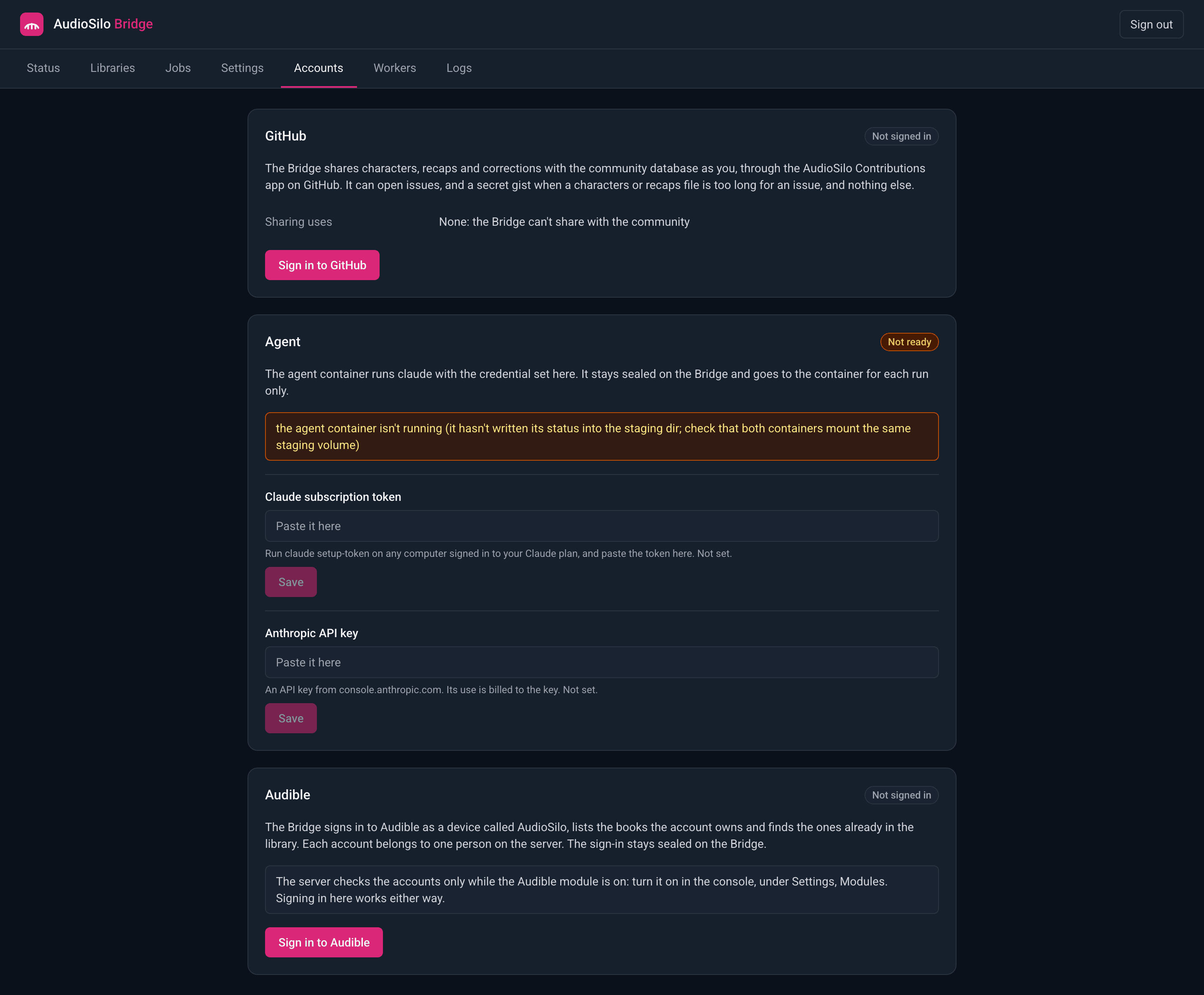
To sign in:
- On the Accounts tab, press Sign in to GitHub. The card shows a short code and an address on github.com, and how many minutes the code works for.
- Open the address (on any device), sign in to GitHub if you aren't already, enter the code and authorize AudioSilo Contributions.
- Back on the Bridge's page, the card says Signed in, with your GitHub user name, on its own within a few seconds. Cancel stops a sign-in that is still waiting for its code (when you sign in again after GitHub stopped accepting the old sign-in, that button is Sign out, which also forgets the old one).
What the app may do: open issues on the community metadata repositories it is installed on, and read and write your gists. The Bridge uses that to attach a characters or recaps file too long for an issue as a secret gist, and to look through your recent gists for one an interrupted share already made. It can't change code, read your private repositories or act anywhere else. Your password never reaches the Bridge: GitHub gives it a token, which the Bridge keeps encrypted in its data folder and renews by itself.
The card's states:
| Badge | Means |
|---|---|
| Signed in | the Bridge holds a sign-in GitHub hasn't refused, as the user shown (the Bridge shares with it unless Sharing uses names another token, or says none while the sign-in can't be renewed: see below) |
| Waiting for the code | a sign-in is waiting for you to enter the code on GitHub |
| Sign in again | GitHub stopped accepting the sign-in: you revoked it on GitHub, it expired, or GitHub took a renewal whose answer never reached the Bridge. Press Sign in to GitHub again |
| Signed in (gh) | Bridge 0.4.0: no sign-in here, but sharing goes through the gh command's own sign-in on the Bridge's computer. Sign in here instead signs in through the AudioSilo Contributions app, which sharing then uses |
| Signed in (environment) | Bridge 0.4.0: sharing uses the AUDIOSILO_BRIDGE_GITHUB_TOKEN environment variable (see below), so there is no sign-in to offer here |
| Not signed in | no sign-in yet, and no other token for sharing |
Sharing uses says where the GitHub token for sharing comes from now: this
sign-in, the AUDIOSILO_BRIDGE_GITHUB_TOKEN environment variable (see below), the
gh command's own sign-in on the Bridge's computer (for a Bridge run outside a
container), or none.
The Bridge renews its sign-in with GitHub every few hours. If GitHub can't be reached to renew it before it runs out, the card still says Signed in but Sharing uses says "None: the Bridge can't share with the community" (and the console's Setup card shows it as not signed in) until a renewal works, which the Bridge tries again by itself a minute later. You usually don't need to sign in again. Meanwhile the console offers no Share with the community, no Suggest corrections and no Also contribute to the community switch. A share or corrections job queued as the sign-in ran out fails saying GitHub couldn't be reached, and a generate job waiting to contribute needs Retry once it can. If the card says Sign in again once GitHub can be reached (GitHub took a renewal whose answer never arrived), sign in again.
Signing out. Sign out revokes the sign-in on GitHub and forgets it on the Bridge. If GitHub can't be reached to revoke it, the Bridge forgets it anyway and says so: then revoke AudioSilo Contributions yourself in your GitHub settings, under Applications > Authorized GitHub Apps (while you are signed in, the card's Review access on GitHub opens that page). That page is also where you can revoke the Bridge's access at any time without the Bridge.
Once signed in, turn on the Contributions module in the console to share. What is shared, and how the community reviews it, is in Contributing from your server.
The agent's credential
The Agent card shows the tool the agent container runs (claude or codex),
whether the agent is Ready, and one field for each kind of credential that tool
takes:
| Tool | Fields |
|---|---|
claude (the default) | Claude subscription token (from claude setup-token on any computer signed in to your Claude plan), Anthropic API key (billed per use) |
codex | OpenAI API key (billed per use) |
Paste the credential and press Save (Replace once one is set, Remove
to delete it). It must be one line with no spaces. Each field says Set, with
how long ago that credential was saved, or Not set. With both Claude fields set,
the subscription token is used. A ChatGPT subscription for Codex is signed in in
the agent container instead (agent-login codex, see
Running a Bridge).
The Bridge keeps the credential encrypted and gives it to the agent container for each run only: as a file the container reads and deletes before the AI tool starts, so it is never left on disk there. Replacing a credential that the provider refused lets the jobs that paused for it carry on.
The agent container must be the same version as the Bridge to take a credential this way. An older one says so on the card ("the container is too old"): update its image.
Audible
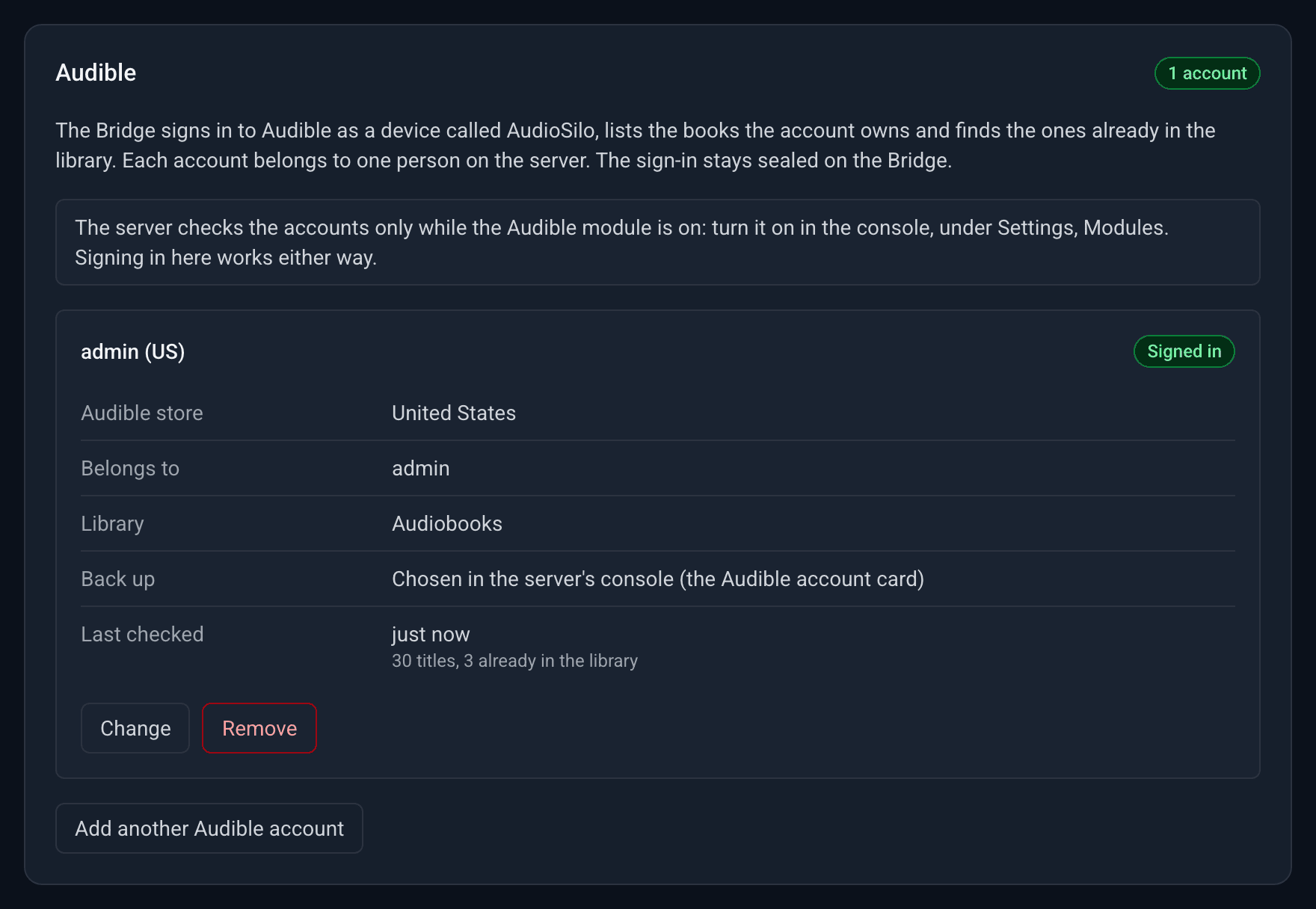
The Audible card signs the Bridge in to one or more Audible accounts. For each account, the Bridge lists the books it owns, finds the ones already in your library and backs up the ones you ask for; the console shows them, and is where you ask, under Server > Settings > Audible. Each account belongs to one person on your server and goes with one books library. The sign-in stays sealed on the Bridge: the server only ever sees the account's name, who and which library it is for, the list of titles and how each backup went.
The Bridge lists, matches and backs up: it shows which of your Audible books are already on your server, and downloads the ones you choose into the account's library (see Backing up). It doesn't keep your listening place in step with Audible yet: that comes in a later version.
The server asks the Bridge to check each account's library every few hours, but only while the Audible module is on in the console. The card says so. You can sign in here with the module off; nothing is checked until it is on.
The Bridge must be paired first: the card asks you to pair it until it is, since an account is always set up for a person on the server.
Signing in
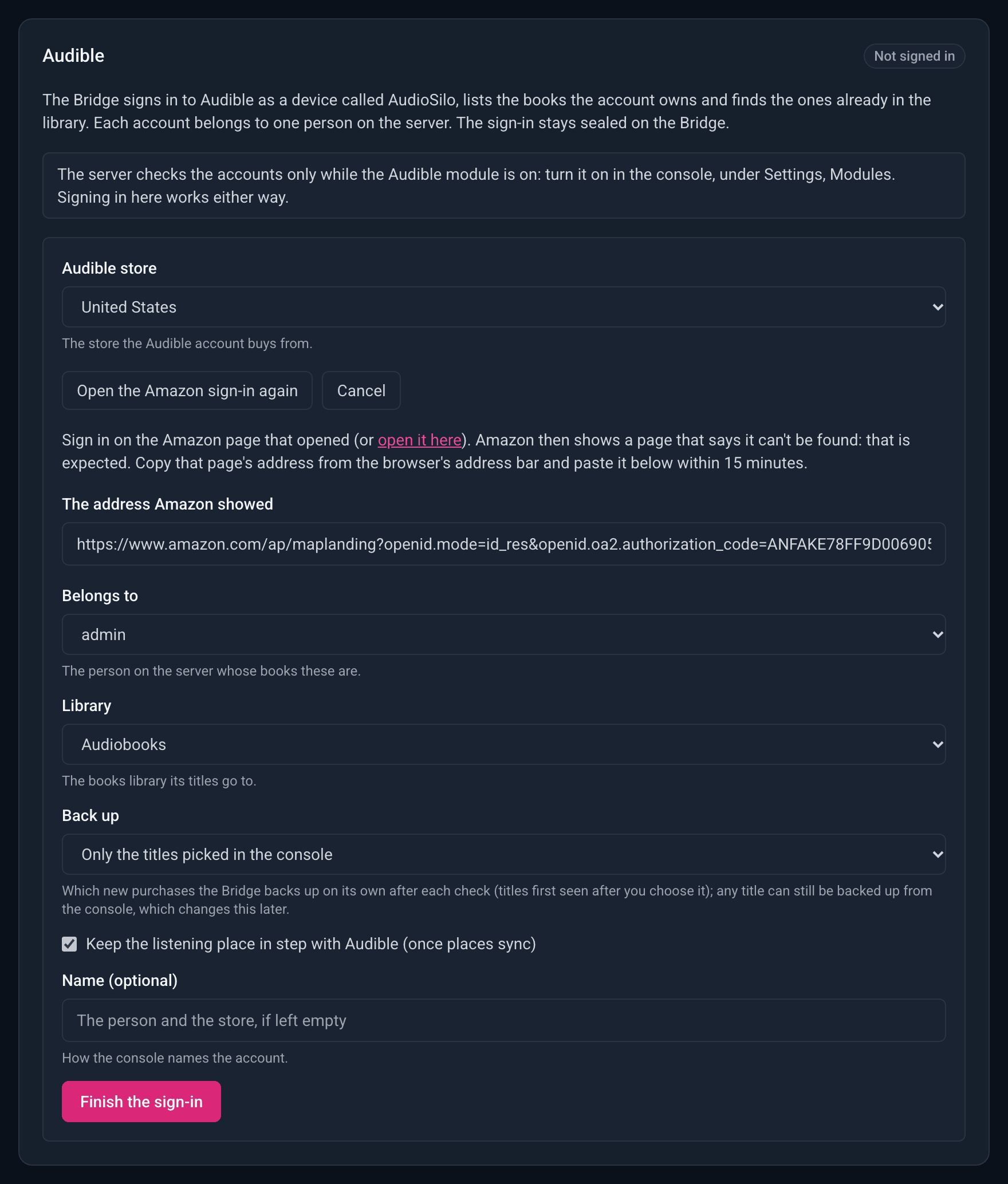
Amazon doesn't let other programs show its sign-in page, so you sign in on Amazon's own page in your browser and then paste back the address it ends on:
- Press Sign in to Audible (Add another Audible account once there is one).
- Pick the Audible store the account buys from (United States, United Kingdom, Germany and so on) and press Open Amazon sign-in. Amazon's sign-in page opens in a new tab (if your browser blocked it, use the card's open it here link).
- Sign in to Amazon as you normally would, including any code Amazon asks for.
- Amazon then shows a page that says it can't be found. That is expected. Copy that page's whole address from the browser's address bar.
- Back on the Bridge's page, paste it into The address Amazon showed. You have 15 minutes from pressing Open Amazon sign-in; after that, open the sign-in again.
- Choose who and where the account is for (below), then press Finish the sign-in.
The card says Signed in to Audible, and the account appears with the badge Not checked yet until its first check. The Bridge appears in your Amazon account's list of devices as "<your first name>'s AudioSilo". Your Amazon password never reaches the Bridge: Amazon gives it a sign-in for that device, which the Bridge keeps encrypted in its data folder.
Signing in to the same Amazon account (in the same store) again doesn't add a second account: it replaces the sign-in of the one already here, and removes the old device from your Amazon account.
Who and where each account is for
| Field | What it is |
|---|---|
| Belongs to | the person on your server whose books these are. The list holds the server's adults and admins, including grown-up household members; never a kid, the demo account or a disabled account |
| Library | the books library the account's titles are matched against, and where its backups go. Podcast libraries aren't offered. The Bridge must have this library mapped and writable on its Libraries tab to back anything up |
| Back up | only when you add an account: which new purchases the Bridge backs up on its own after each check: Every new title, New titles in a series they already have, or Only the titles picked in the console. After that you change it in the console (Backup settings... on the Audible accounts card); Change here says so and leaves it as it is |
| Keep the listening place in step with Audible | for when places sync, in a later version |
| Name (optional) | how the console names the account. Left empty, it is the person and the store, such as "Chris (US)", and it follows the person if you change who the account belongs to |
Change on an account edits these. A change is saved on the server first, so if the server can't be reached nothing changes.
The account's states
| Badge | Means |
|---|---|
| Not checked yet | signed in; the server hasn't asked for a check yet (or the Audible module is off) |
| Signed in | checked at least once. Last checked says when, with how many titles the account has and how many are already in the library |
| Sign in again | Audible refused the sign-in, for example after you removed the device in your Amazon account or changed your password. The card says why; press Sign in again, which keeps the store and the account's settings. Until then its checks fail |
| Mapped on another server | the account was set up while the Bridge was paired with another server. Press Change and save to set it up on this one |
A check that failed for another reason (Amazon or the server couldn't be reached) shows its error on the account; the next check tries again.
Removing an account
Remove, then Remove the account, removes it everywhere: the Bridge forgets the sign-in, the server forgets the account and its titles, and the Bridge removes its AudioSilo device from your Amazon account. The books already in your library stay. If the server or Amazon couldn't be reached, the account is removed from the Bridge anyway and the card says what didn't happen: remove the device yourself in your Amazon account's device list, or the account in the console (below).
The console's Remove under Server > Settings > Audible is different: it removes the account from the server only. Use it for an account the Bridge can no longer remove, for example after you unpaired or replaced the Bridge. It signs nothing out of Amazon, so remove the device in your Amazon account too. The console shows it only while the Audible module is on: turn the module on first.
Backing up is for making a personal backup of books you bought, with your own account. Laws on removing DRM, even from your own purchases, differ from country to country, and in some places it is not allowed at all. Check your local law before you use it, and keep the copies for yourself.
Settings that take precedence
Two credentials set outside the page win over the ones set here, so a Bridge set up from its compose file keeps working as before:
AUDIOSILO_BRIDGE_GITHUB_TOKENin the Bridge'senvironment: a GitHub token of your own (how earlier versions were set up: a fine-grained token that can open issues on the community metadata repositories, and create gists for characters or recaps too long for an issue). While it is set, the Bridge shares with it rather than the sign-in (unless GitHub refuses it: then the sign-in is used), and the GitHub card says so. It is read from the environment only: remove it and restart the Bridge to use the sign-in. (Earlier versions kept an encrypted copy of it; this one deletes that copy.)- A credential in the agent container:
CLAUDE_CODE_OAUTH_TOKEN,ANTHROPIC_API_KEY,OPENAI_API_KEYorCODEX_API_KEYin its environment, the matching file in/agent/secrets/, or a Codex sign-in. While the container has one for the tool it runs, it uses its own, and the Agent card says so.