Organizing your library
Organizing your library
AudioSilo has no import step and no required naming scheme. It reads your books folder as-is: the files on disk are the source of truth, and the server only builds a searchable index over them - one it can rebuild at any time. You keep organizing your files however you like; this page explains how AudioSilo interprets what it finds.
One folder = one book
The core rule is simple: a folder that directly contains audio files is one book, and all the audio files in it are that book's parts, played in filename order. This matches how most collections are already organized (and how tools like Audiobookshelf expect them):
Audiobooks/                          ← the library root
├── Terry Pratchett/
│   └── Discworld/
│       ├── 01 - The Colour of Magic/
│       │   └── The Colour of Magic.m4b        ← one file, one book
│       └── 02 - The Light Fantastic/
│           ├── Part 01.mp3                    ← many files, still ONE book
│           ├── Part 02.mp3
│           └── cover.jpg
└── Project Hail Mary.m4b                      ← loose file at the root: its own book
It doesn't matter whether a book folder holds a single .m4b or fifty numbered .mp3 chapter files - the folder is the book. Number multi-file books so they sort correctly (01, 02, … rather than 1, 2, … 10).
The one exception is the library root itself: loose audio files sitting directly in the root are each treated as an individual single-file book, so a simple "flat folder of m4b files" library works with no folders at all.
If a book is split across CD1/CD2-style subfolders, each disc folder counts as its own book. For the best result, move all the files into a single folder for the book (rename them so the discs stay in order).
When a folder holds many standalone books
One layout the automatic rule gets wrong on purpose: a folder that holds a pile of unrelated single-file books, like:
Audiobooks/
└── Short Stories/
    ├── The Dead.m4b
    ├── The Gift of the Magi.m4b
    └── The Yellow Wallpaper.m4b
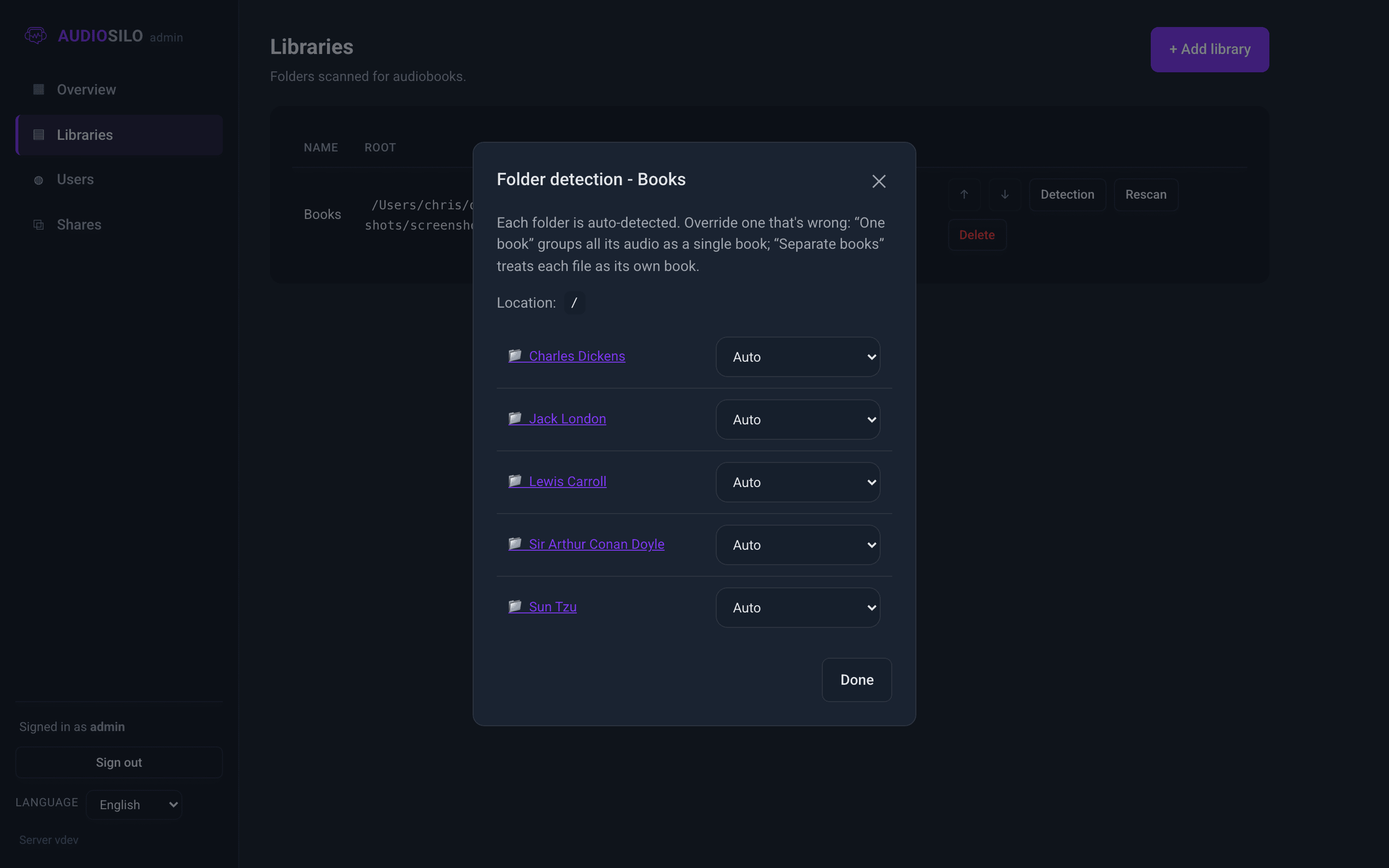
By the folder-per-book rule, Short Stories would become one three-part "book". The fix is a per-folder override, set from the admin console. Each folder can be pinned to one of two modes:
- Collection - every audio file in this folder is its own book (what you want for
Short Storiesabove). - Book - force this folder to be one book, if the detector ever splits something that belongs together.
Overrides are set in the per-library Detection browser in the admin console, and they stick - they survive rescans and index rebuilds. See Libraries for a walkthrough.
Supported formats
AudioSilo recognizes these audio file types (upper or lower case):
- M4B / M4A / MP4 - the common audiobook containers (AAC audio)
- MP3
- FLAC
- OGG / Opus
Anything else in your folders - .jpg covers, .nfo files, .pdf companions - is simply ignored and hidden from browsing, so everything you can click in the player is playable.
:::note Audible files (.aax / .aaxc) Audible's DRM-protected files are deliberately not indexed: the server can never play them, since they need per-account decryption. The desktop manager's Audible backup converts books you own to ordinary M4B files first, and those go in your library. :::
Where titles, authors and series come from
For each book, AudioSilo starts with the names on disk, then lets the audio files' embedded tags override them when they're present and meaningful:
- From your folders: the book's folder (or file) name becomes the title; a leading number like
03 - The Titleis read as its position in a series; the parent folder is read as the series and the folder above that as the author. So anAuthor/Series/03 - Title/layout works with no tags at all. - From embedded tags: a title (audiobooks usually carry it in the album tag; when the album holds the series name and the title tag carries the full "Series: Book" title, the more specific title tag wins), the author (album artist or artist tag), the narrator (composer or narrator tag), and the series where a tag exists. Junk tag titles like "Track 01" are ignored in favour of the folder name.
- From ffmpeg's ffprobe, when available: durations and any chapter list embedded in the file, so a chaptered M4B shows its real chapters in the player.
Audiobook tags are famously messy, which is why the folder names always provide a sane baseline - a well-named folder beats a badly-tagged file.
Covers
Cover art is found in this order:
- A conventionally named image beside the audio:
cover.jpg,cover.jpeg,cover.png,folder.jpg, orfolder.png. - Inside a book's own folder, any image file will do as a fallback (one with "cover" in its name is preferred over, say, a stray thumbnail). For loose single-file books, only the conventionally named files count - a random image next to twenty loose books would be ambiguous.
- Failing both, artwork embedded in the audio file itself is used.
So in practice: embedded art just works, and dropping a cover.jpg into a book's folder overrides it.
Renaming and moving are safe
Your listening progress, bookmarks and notes belong to the file, not to a database entry - and AudioSilo goes out of its way to keep them attached:
- Fix the tags in a file and nothing is lost: the path didn't change, so all your state stays put (and the index re-reads the new tags on the next scan).
- Rename or move a book and the server notices: it keeps a lightweight fingerprint of each file, and when a known file disappears from one path and reappears at another, your progress and bookmarks migrate to the new location automatically.
Reorganize freely - the whole design assumes your library will keep evolving.
:::note Books on a network share Library folders must be paths the server machine can read directly - mount an SMB/NFS share on the host first, then point the library at the mounted path. If the share is unmounted while the server runs, AudioSilo refuses to treat the missing files as deleted, so nothing is pruned and your progress is safe; the books reappear when the share is back. :::