The companion
The companion keeps everything about the book you're listening to one tap away, without leaving the player:
- Who's who - the people you've met so far.
- Story so far - what's happened up to where you are.
- Chapters - every chapter, and how long until each one.
- Bookmarks, Notes and History - your own, for the book.
Where it is
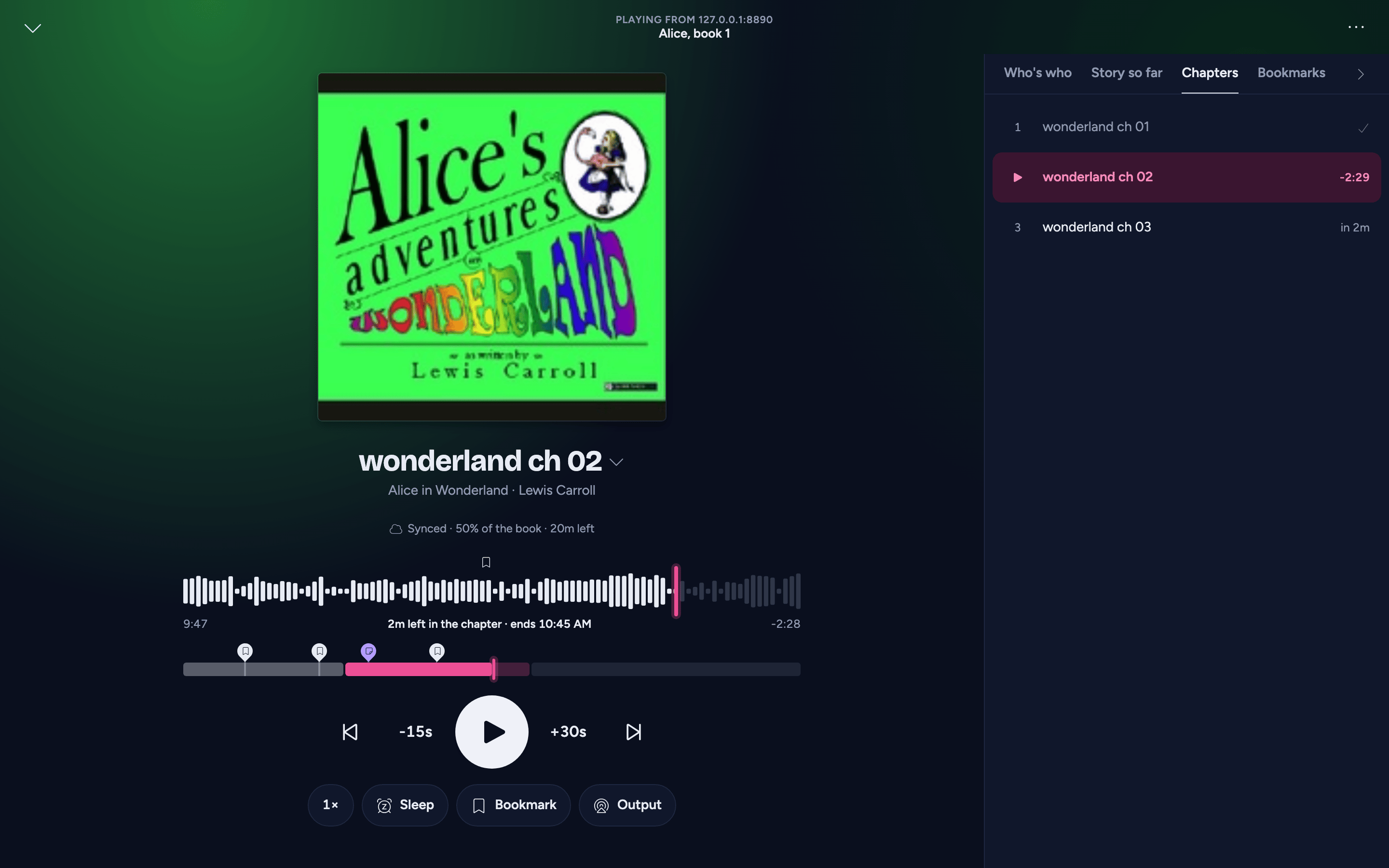
A column beside the full player on a computer, under its controls on a tablet, and a sheet from the chips under the controls on a phone. It reopens on the tab you used last.
Who's who and Story so far come from the community database, AudioSilo Meta, so they appear only when your server has community metadata switched on. For a book nobody has written character notes or recaps for yet, the tab says so.
Nothing ahead of where you are
Who's who and Story so far follow the book page's spoiler rule: they follow where you are as you listen, moving on with you chapter by chapter, and Show anyway reveals what's held back in both tabs at once. Here it stays revealed for that book when you close and reopen the player, until you reveal another book (which starts hidden) or restart the app.
Who's who
The people you've met, the most recently met first, as the same cards as on the book's page: an initial, the name, other names they go by, when they first appear ("From chapter 7") and their role. A character's description is written for the whole book and can give away later events, so it stays closed until you tap the card.
Meeting someone new
When the book plays on into a chapter that brings in people you hadn't met, they appear at the top of Who's who marked Just met, and a note says so wherever you are in the app: "New in Who's who: Teft, Rock". Tap Show to open the player on Who's who. Jumping ahead, skipping or picking the book up again never brings it up, and nobody is announced twice in one listening session.
Story so far
The community recaps written to stop where you are, in story order, under a heading such as "Up to chapter 22". A new part appears as you finish each chapter. A recap from before the book starts (a catch-up from earlier in the series) is labelled as such, and a whole-book summary stays behind a row marked Spoiler while you're still listening.
Chapters
Every chapter, with how much of the one you're in is left; earlier ones ticked, later ones with how long until they start ("in 2h 4m", at your speed). In the column on a computer and the sheet on a phone, the list opens on the chapter you're in. A book without chapter marks lists its files as chapters, or the virtual chapters of one long file; while a book's file lengths aren't known yet, it lists the files without times. Tap one to jump to it.
Bookmarks, notes and history
The same lists as on the book's page, for the book that's playing, all saved to your account:
- Bookmarks - Bookmark 1:16:19 marks where you are (so does the bookmark button among the player's actions); tap a bookmark's time to jump to it.
- Notes - Note at 1:16:19 pins a note to where you are; tap a note's time to jump to it.
- History - your listening sessions, newest first; Jump goes back to where one ended.
Editing, labels and deleting with Undo work as on the book's page: see Bookmarks and notes. See all in your journal opens the Journal.
A jump from these lists can be undone. They need the book's server: if it isn't connected any more (a downloaded copy playing on), they say "This book's server isn't connected" until it is.
Who wrote it
Under Who's who and Story so far, a line credits the contributors ("Community notes from" them) and links the open licence they share under, which asks for that credit wherever the notes appear.