The end of a book
The end credits
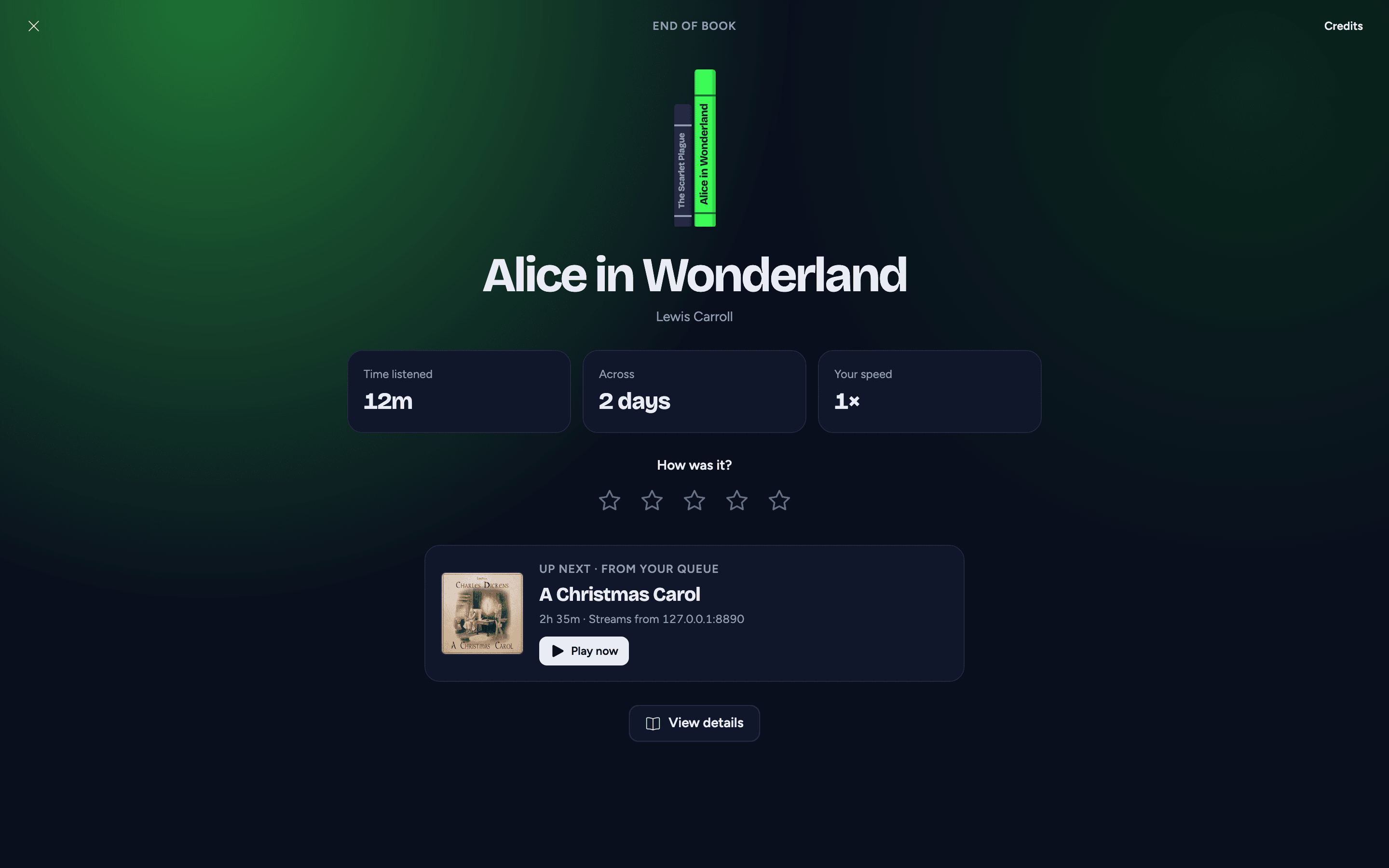
When a book reaches its end, AudioSilo marks it finished (it leaves your Continue listening shelf and Up next), hides the mini player or player bar, and shows the end credits:
- Your year's shelf - the books you've finished this year as a row of spines, the one you just finished at the end, with "Book 12 this year · you finished" above the title. (Before your first other finished book of the year, or on a server without listening stats, the book's cover instead.)
- The title, author and narrator.
- How you listened - your speed and, once your server has your listening sessions for the book, the time you actually spent listening and across how many days. (Stretches shorter than 20 seconds, and listening while the server can't be reached, aren't recorded.)
- How was it? - one to five stars, on a server that keeps ratings.
- Up next - the book that plays next, why it's next ("Up next · from your queue", "Up next · The Stormlight Archive, book 3", "Up next · next in this folder"), its length, and whether it's downloaded or will stream. Play now starts it; if it can't start, a note says "Couldn't start Oathbringer. Try again."
- View details opens the finished book's page.
Credits at the top right lists who made the book: author, narrator, publisher and release date when known, the community credit when the book is matched in AudioSilo Meta, and where the book lives on your server. The X closes the screen.
You can open the end credits early from the full player's three-dot menu (View end credits, or Mark as Finished). Opened early with View end credits, the book keeps playing, and nothing starts by itself until it really ends. Play now there starts the next book straight away; the book you were in keeps your place, stays unfinished and keeps its download. Only a book that has actually ended (or that you marked finished) is finished when the next one starts.
What plays next
AudioSilo picks the next book the same way everywhere:
- The first book in your Up next queue, skipping any you've finished.
- Else the next book in the series: your server works it out from the community's reading order, then the series numbers, then the next book in the same folder.
- On an older server, the next book in the same folder (in natural order, so Book 2 comes before Book 10).
When it starts, it leaves Up next - it's the book you're on now.
If nothing on your server comes next, the card says End of the series, and when the community database knows the next book but your server doesn't have it, you'll see that book as a pale cover saying it isn't on this server, with View on AudioSilo Meta. A gap in the middle of a series is skipped: missing book 3, the card offers book 4 after book 2 (while book 2 plays, the suggestions in Up next show book 3 as that pale cover). AudioSilo never tries to play a book you don't have.
Playing on automatically
Turn on Automatically play next book in Settings (the same switch as Play the next book automatically at the bottom of Up next):
- After a book finishes, a ring on the Up next card counts down 15 seconds, then the next book starts. Not now stops it for this visit.
- If you opened the credits early while the book is still playing, the card counts down the time left in the book; nothing starts until it ends.
- A sleep timer has the last word. If a book ends while a sleep timer is running for it, nothing starts by itself: the credits wait for you.
If the app is in the background when a book ends (the screen locked, or another app open), there's no countdown: with auto-play on, the next book starts straight away and the mini player shows it when you return. Otherwise - auto-play off, nothing next, or a sleep timer running - the end credits are waiting when you come back. (If you had already opened the end credits, they stay instead and their countdown carries on - on a phone, once you're back in the app.)
Download automatically and Remove a download when you finish the book keep this smooth and tidy; see Up next and downloads in Settings.