The Journal
The Journal is your listening, looked back on: a Diary of every day you listened, and every bookmark and note you've made, from every book on every server you're connected to.
Opening it
The Journal is part of You:
- On a phone: the Journal section of the Me tab.
- On a tablet or computer: Journal under You in the top bar, or Journal in your profile menu.
- In the web player's quick search: Journal, under Go to.
- On a book's Bookmarks or Notes tab: See all in your journal, which opens straight on that list. See them in your Journal under Finished this year opens it too.
Across the top: three tabs, Diary, Bookmarks and Notes, and the export buttons. Bookmarks and Notes show how many you have.
The Diary
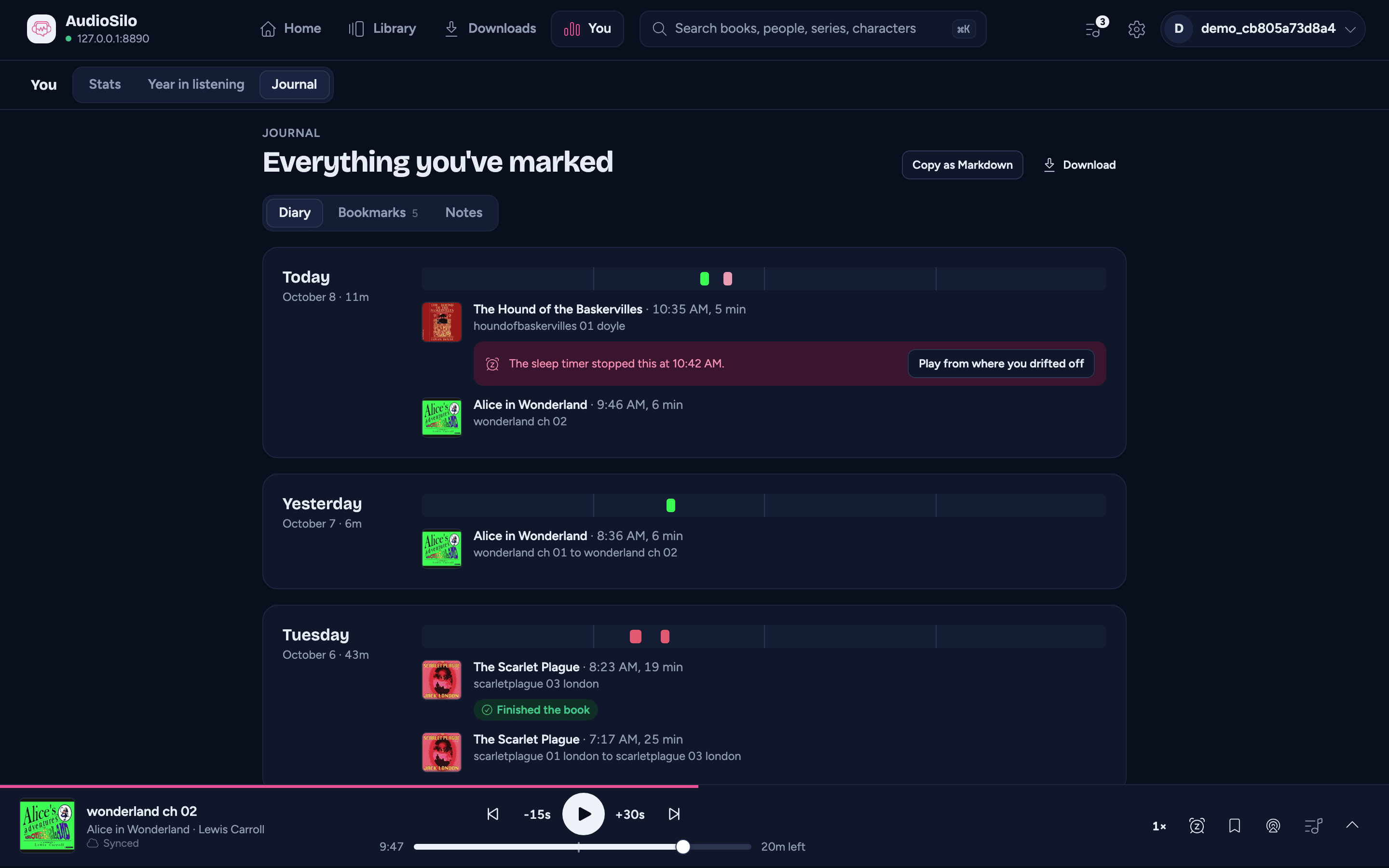
One card for each day you listened, newest first: Today, Yesterday, the weekday for the rest of the week, then the date. Each card says how long you listened that day and has:
- A 24 hour bar - each stretch of listening drawn where it happened in the day, in its book's cover colour, with faint marks at 6:00, 12:00 and 18:00. You can see at a glance whether that was your commute or a late night.
- The sessions, newest first: the book's cover and title, when you started and how long you listened ("21:12, 21 min"), and where you went in the book ("Bridge Four to The Shattered Plains", or the times when its chapters aren't known yet). A pause of under ten minutes doesn't split a session; listening to another book in between, or jumping more than a couple of minutes away in the book, does. A session that reached the end of the book says Finished the book.
Tap a cover to open that book's page on its History tab. When you're connected to more than one server, each session also names its server.
The Diary works with any AudioSilo server. An older server sends only your most recent listening, so it can't scroll back as far.
Drift-offs
When the sleep timer stopped a book you'd fallen asleep to, a strip under that session says so:
- On the device you were listening on, for a day and a half or until you play the book again: "You drifted off around 23:41. Jump back 4 minutes?" Jump back takes you to the last moment you touched the player, when you were surely still awake. Once you've used it, the strip offers the bookmark instead, so a second tap can't take you back again.
- Otherwise: "The sleep timer stopped this at 23:45." Play from where you drifted off starts the book where the timer stopped it.
Bookmarks and notes
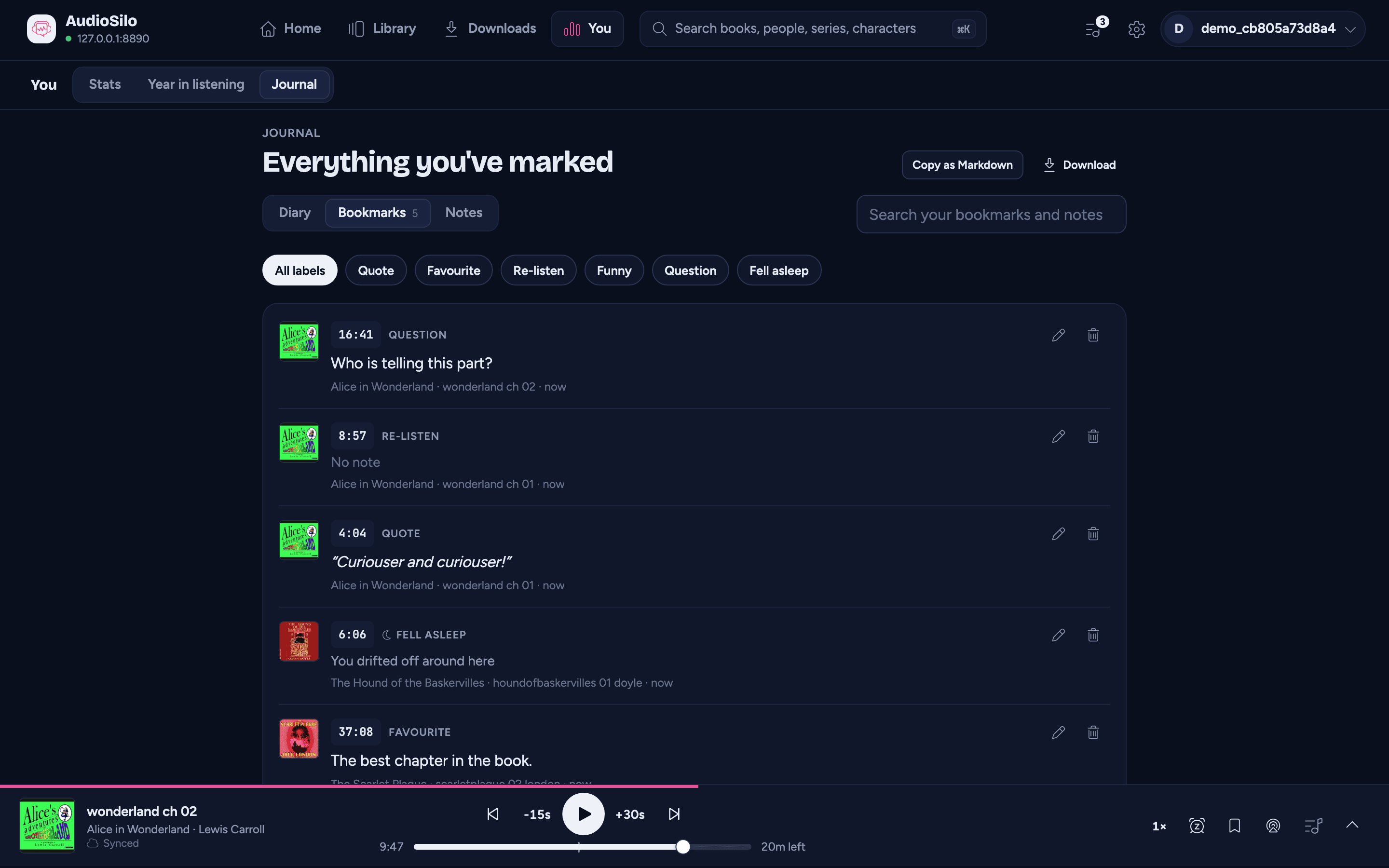
The Bookmarks and Notes tabs gather every one you've made, from every book, newest first. Each row leads with the book's cover (tap it to open the book's page on that tab), then the time (tap it to jump there), the label and note, and the book, chapter and how long ago. Edit and Delete work just as they do on a book's page (see Bookmarks and notes).
- Search ("Search your bookmarks and notes") looks through the book titles, the authors and your words, ignoring capitals and accents (emile finds Émile).
- On Bookmarks, the label chips narrow the list to one kind: Quote, Favourite, Re-listen, Funny, Question, or Fell asleep for the sleep timer's marks. All labels shows everything again.
These two lists need a recent AudioSilo server. If one of your servers is older, a line above the list says its bookmarks are only on each book's page; if none of them can list them, the tab says so and offers Go to the Library instead. A server that can't be reached right now gets a line of its own, and the rest still show.
Exporting your bookmarks and notes
Export takes every bookmark and note from every server that can list them, and writes them out as a file you can keep, print or open in a spreadsheet. (The Diary isn't included.)
- In the web player: Copy as Markdown puts it on the clipboard, and Download offers Download Markdown and Download CSV. In a narrow window they fold into one Export menu.
- In the iOS and Android apps: Export offers Share as Markdown and Share as CSV, which open your phone's share sheet, so you can save the file to Files, mail it, or send it to another app.
While it gathers a big journal it counts as it goes ("Gathering 240 entries").
- Markdown groups everything by book, in the order the book reads: a heading with the title and the author, then each entry with its time, whether it's a bookmark or a note, its label, its chapter and when you made it, and your words underneath.
- CSV is one row per entry, with columns for the type, book, author, position, chapter, label, text and when it was made (and the server, when there's more than one). It's saved so that Excel and other spreadsheets open it with accents intact, and a note that happens to start with
=is shown as text, never run as a formula.
Files are named after the day, such as journal-2026-10-07.md. The chapter is filled in for books whose chapters this device already knows (any book you've opened or played on it). Each list stops at its newest 10,000 entries per server; if that happens, a note says so.