Sharing a device with your household
A family tablet, a phone that gets handed round in the car, the computer in the kitchen: when more than one person listens on the same device, each of them can have a profile of their own. A profile is a person on this device. Each person signs in with their own AudioSilo account, so each keeps their own place in every book, their own Up next, bookmarks and listening stats. The app shows one person's books and servers at a time: whoever is listening now.
If you were already using AudioSilo when profiles arrived, nothing changes until you add someone: everything you were signed in to is now your profile, and nobody was signed out.
Who's listening?
Who's listening? shows everyone on this device as a large initial in a coloured circle, with a line under each name. The person listening now has a pink ring. Tap someone to switch to them, or Close to carry on as you are.
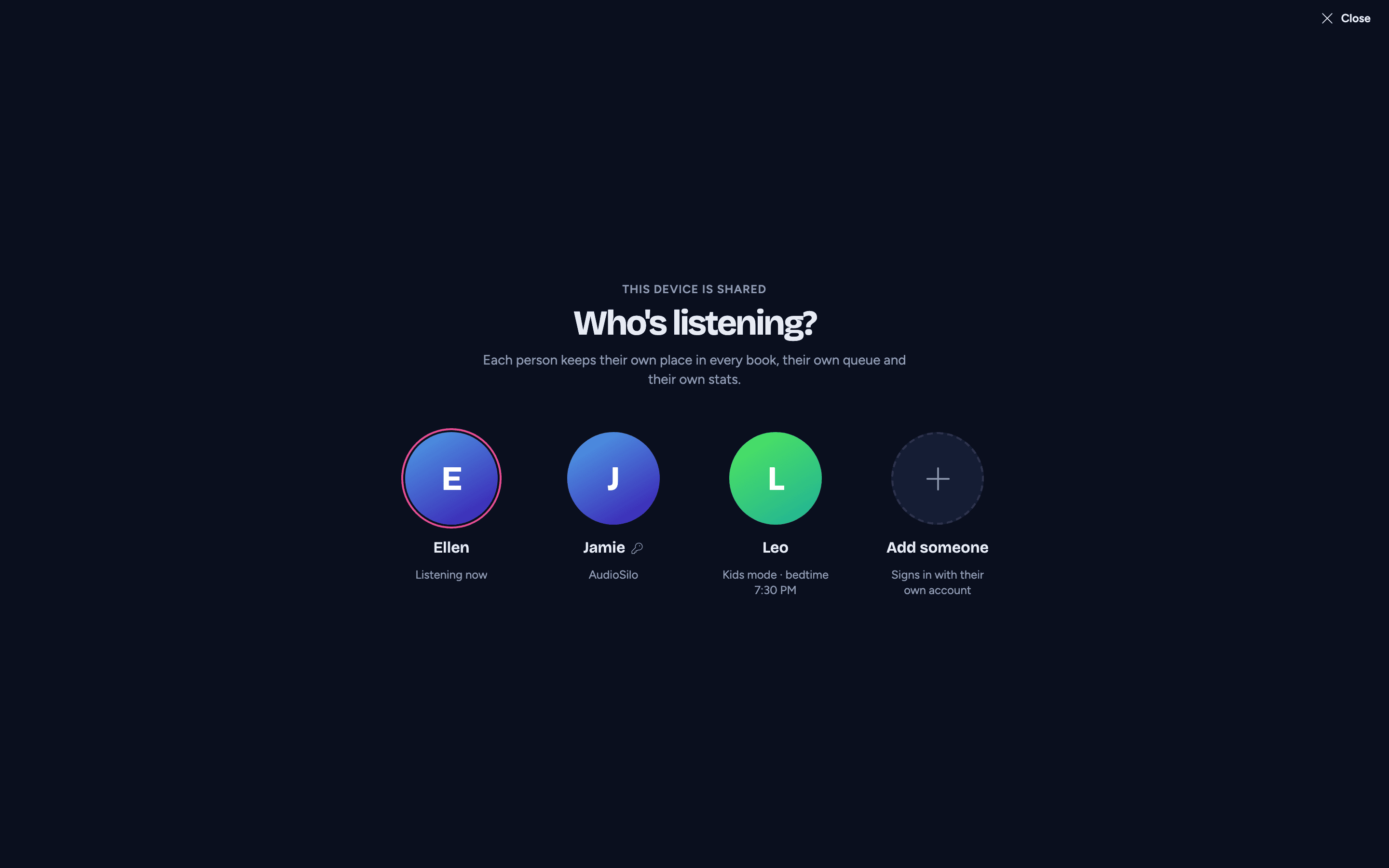
Open it from:
- on a phone, the Me tab's Account section, under Listening as;
- on a tablet or computer, your profile menu (top right), which also lists the other people to switch to straight away;
- Settings > Household and sharing.
With two or more people on the device it also opens when the app starts, so whoever picks it up chooses first. Turn that off with Ask who's listening when the app opens in Settings > Household and sharing. It's turned on for you when a second person is added.
Adding someone
Tap Add someone on Who's listening? (or in Settings > Household and sharing). They sign in with their own account, on your server or on another one, exactly as when connecting a server. They become a new person on this device, and the app switches to them.
Each person can have one account on each server. If you sign in to a server where you already have an account, as a different user (a child's account on the family server, say), that account becomes a new person too, rather than replacing yours.
Switching
When you switch to someone else:
- the book that was playing, if it's the other person's, is paused, its place saved, and put away, so the next person doesn't find someone else's book in the player;
- the app goes to the new person's Home page, with only their servers, books, downloads, Up next and stats;
- the car lists change to the new person's, and the iPhone widget clears until they play something.
Nothing of the other person is lost: their downloads stay on the device, and listening they did offline still syncs to their account in the background.
A PIN for a person
Each person can have a PIN: four digits, asked whenever someone switches to that person. It's off by default. Set, change or remove it in Settings > Household and sharing, under that person's PIN. Changing or removing a PIN asks for the current one first.
- A wrong PIN says "That PIN doesn't match". After five wrong tries in a row, the prompt makes you wait 30 seconds.
- Leaving kids mode goes through Who's listening?, so whoever is chosen there is asked for their PIN.
- A PIN stays on this device: it isn't your account's password, and the server never sees it. It keeps a person's place and books away from a sibling's taps; it isn't a lock against someone determined to get in.
Forgotten a PIN? Remove that person from this device in Settings > Household and sharing (removing someone doesn't ask for their PIN), then sign in to their account again with Add someone. Their place in every book is on the server, so nothing is lost.
Settings > Household and sharing
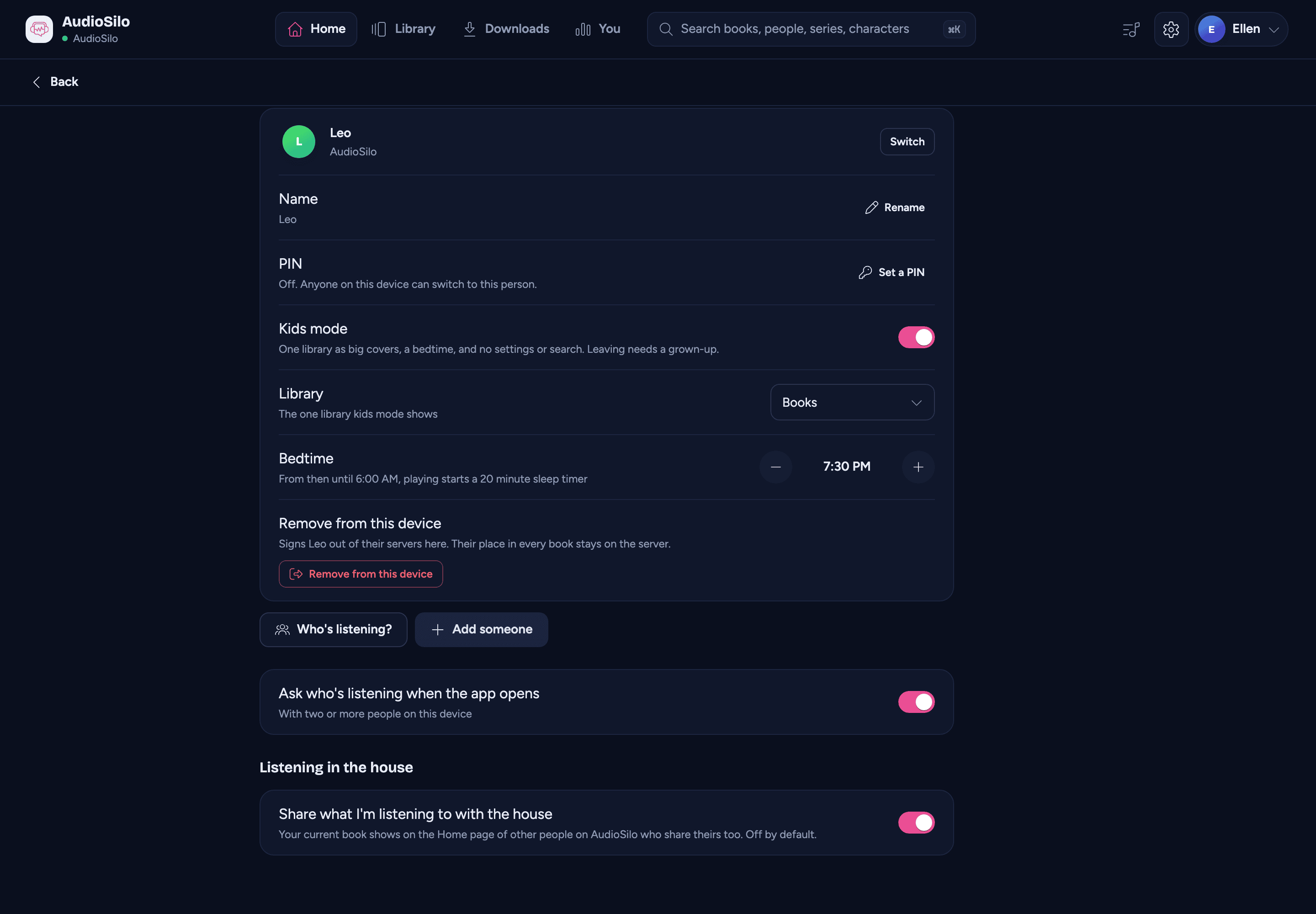
Settings lists everyone on this device. For each person:
- Switch to them (the person listening now is marked Listening now);
- Name: rename them. The name shows on this device only; their account keeps its username;
- PIN: set, change or remove it (above);
- Kids mode, with its library and bedtime (see Kids mode);
- Remove from this device: signs them out of their servers on this device and deletes their downloads here. Their place in every book stays on the server. If they have no password on a server, the app warns you first: they'll need a new invite to sign in there again.
Below the people: Who's listening?, Add someone, the Ask who's listening when the app opens switch, and Listening in the house, one switch per server of the person listening.
When the person listening is removed
If the person listening now is removed from the device, or signs out of their last server, and other people are left, the app asks Who's listening? straight away, and it can't be closed: nothing of anyone shows until someone is chosen (with their PIN, if they have one).
Links to someone else's book
A link can belong to someone else on the device: the iPhone widget or Live Activity left showing their book, a page in the web player's history, a link someone shared. Instead of opening it, the app says "This belongs to Sam", with Switch to Sam (asking for Sam's PIN if there is one) and Go back. After switching, the page opens where you are.
A link to a server this device is no longer signed in to says "Not signed in to that server", with Go back.