The sleep timer
The sleep timer stops the book for you, so you can listen yourself to sleep without losing your place. Tap the sleep button (an alarm clock, labelled Sleep where there's room) in the full player or on the player bar to open it (in the web player, the Z key does too).
Setting a timer
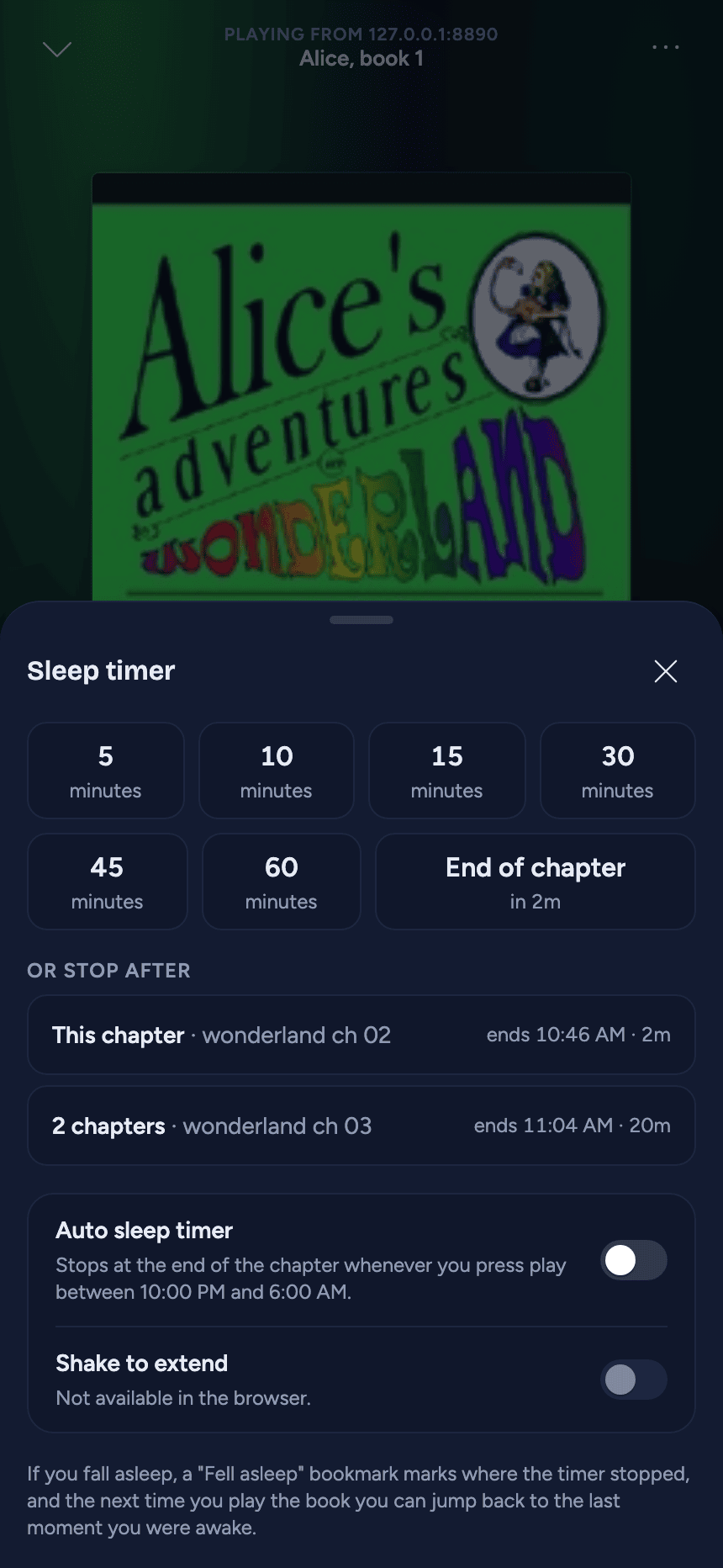
- Minutes - 5, 10, 15, 30, 45 or 60.
- End of chapter - when the current chapter ends ("in 12m"; in its last 30 seconds, when the next one ends). A book without chapter marks has a chapter for each of its files, or virtual chapters if it's one long file; a short single file may offer End of book instead.
- Or stop after - for a book with chapters (not virtual ones), this chapter and up to three more (as many as the book has left), each with the clock time it ends: "3 chapters · The Shattered Plains · ends 23:41 · 1h 4m".
Tap one to start it. The times are real time at your current speed.
While a timer runs
The countdown shows on the sleep button, and first in the mini player's second line on a phone. Open the sleep timer again to see what's set ("Stopping after 3 chapters" counts down as chapters go by), Turn off the timer, or pick another option to replace it. When it fires, playback simply pauses. A timer belongs to its book: start another book and it goes away. And if a book ends while a timer is still running for it, whatever it was set to, the next book doesn't start by itself.
Pausing: a minutes timer pauses with the book, so thirty minutes means thirty minutes of listening. Come back after more than 20 minutes and it starts again at its full length; after more than two hours it's over. A chapter timer waits where you left it, however long you're away.
The last 30 seconds
In a timer's last 30 seconds a card appears with a ring that empties: in the full player in place of the status line, elsewhere just above the player bar or the mini player.
- A minutes timer fades out over those 30 seconds ("Fading out in 24 s").
- A chapter timer plays them at full volume and stops at the chapter's end ("Stopping in 24 s").
When the timer pauses the book, the card stays for 30 seconds more ("Paused by the sleep timer"). Until it goes, Keep listening (on the card or in the sleep timer) or a shake of the phone starts the timer again - the same number of minutes afresh, or one more chapter - and starts playback again if it had stopped. (If you pause a minutes timer yourself during its fade, the volume comes straight back and the card goes away; the fade picks up again when you press play.)
Safari on iPhone and iPad doesn't let a web page change its volume, so in the web player there a minutes timer's last 30 seconds don't audibly fade. Everything else works the same.
Shake to extend
In the iOS and Android apps, a shake in those two windows does the same as Keep listening; at any other time a shake does nothing. Two settings, in the sleep timer and in Settings:
- Shake to extend - on out of the box.
- Shake sensitivity - Low, Medium (the starting point) or High: how hard the shake has to be. Choose Low if bumps in bed keep the book going.
The web player can't feel the phone move, so there it says "Not available in the browser".
If you fell asleep
When the timer stopped a book you were playing and nobody kept it going in those last 30 seconds, AudioSilo assumes you fell asleep:
- A "Fell asleep" bookmark goes on the book where the timer stopped it, with a small moon and the Fell asleep label (see Bookmarks and notes).
- The next time you play the book on that device, soon after and near where it stopped, a note offers once to take you back: "You drifted off around 23:41. Jump back 4 minutes?" Jump back returns to the last moment you touched the player.
- The next morning, the Journal's Diary shows it under the listening the timer ended.
Starting a timer automatically at night
Turn on Auto sleep timer (in the sleep timer, or in Settings, where you choose the hours and the kind of timer) and any book you start inside those hours gets a timer. It never adds a second timer or replaces one you set. If a timer runs out and you press play again inside the window, you get a fresh one. Turn a timer off and no automatic one comes back for that book until you next start the app.